5% Off Powermat

Join The Community

Showing posts with label 4G. Show all posts
Wednesday, October 20, 2010

PwnageTool 4.1 for Jailbreaking Apple TV 2G, iPhone 4, iPad and iPod touch 4G Now Available for Download

The iPhone Dev Team has finally released PwnageTool 4.1 which is based on recently released Geohot’s bootrom-based Limera1n exploit. This exploit enables this new version of PwnageTool to build custom firmware files for A4 devices like iPhone 4, iPad, Apple TV 2G and iPod touch 4G which was something, previously not possible.

Sunday, October 17, 2010

How to Jailbreak iPhone 4, 3GS, iPad, iPod touch 4G / 3G on iOS 4.1 with GreenPois0n on Mac OS X [Guide]


The following step by step instructions are going to help you jailbreak iOS 4.1 on iPhone 4, 3GS, iPad, iPod touch 4G / 3G using GreenPois0n on Mac OS X. Support for Apple TV and iPod touch 2G will be added soon.

Wednesday, October 13, 2010

Download GreenPois0n to Jailbreak iPhone 4, 3GS, iPod touch 4G / 3G, iPad


GreenPois0n is now available for download. If for some reason Limera1n didn’t work for you, you can give this one a try to jailbreak iOS 4.1 on iPhone 4, 3GS, iPod touch 4G / 3G and iPad. Support for iPod touch 2G and Apple TV will also be added soon.

Sunday, October 10, 2010

Jailbreak iOS 4.1 on iPhone 4, 3GS with Limera1n [How to Guide]


Limera1n has been released for all iOS devices including: iPhone 4, iPhone 3GS, iPod touch 4G / 3G, iPad running iOS 4.1, and iOS 3.2.2 respectively. Limera1n is currently available for Windows only, however a Mac and Linux version will be available soon.

Download Limera1n to Jailbreak iOS 4.1 on iPhone 4, 3GS, iPad, iPod touch 4G


Its here folks! and its real!! Geohot is back big time with limera1n jailbreak for all  iOS devices including: iPhone 4, iPhone 3GS, iPad, iPod touch 4G / 3G / 2G, untethered running iOS 4.1.

Wednesday, September 15, 2010

"Greenpois0n" coming soon


My Name is Greenpois0n. I'm on the way to jailbreak all the iDevices with the latest iOS 4.1.
So stay tuned with us.

Thursday, September 9, 2010

Confirmed ! iOS 4.1 Jailbreak Using Bootrom Exploit works on iPod touch 4G, iPhone 4 and Even iPad !

Just a quick little heads-up, MuscleNerd of iPhone Dev-Team has confirmed that iOS 4.1 Bootrom exploit which was found by another iPhone hacker named pod2g works on the newly released 4th-gen iPod touch 4G, iPhone 4 and even iPad !

Tuesday, August 3, 2010

Enable iPhone 4 FaceTime Video Calls Over 3G with My3G !! [Jailbreak Required]


e all have been waiting for this!! And now that iPhone 4 jailbreak has been released to public, the much awaited update to My3G app has been released !! With this new updated version of My3G for iPhone 4, you can now make FaceTime video calls over your cellular 3G network which otherwise isn’t possible. This in my opinion is a killer app and will alone be worth jailbreaking your iPhone 4 for.

My3G for iPhone 4 FaceTime
Official description of the app is as follows.
Facetime over 3G!!!!
My3G: Take back your 3G! My3G makes Apps believe that they are on WiFi instead of 3G. With My3G, you can now watch HiDef YouTube videos, use Skype/Fring/Other VOIP apps over the 3G network!
Features:
- In-App popup request to enable/never ask for My3G to be enabled for that app
- In-App indicator when My3G changes the network from 3G to WiFi
- Ability to select which apps are My3G enabled and not.
- Default Apps – no configuration for the most popular apps!
- SBSettings Toggle! You can temporarily enable My3G for all apps or toggle back using your defined Apps list
- Dynamic enablement – Higher successs rate (near 100%) then 3G Unrestrictor (which does one off solutions for apps). My3G enables 3G indicators more dynamically.
4.1 Updates
=============
- Facetime over 3G!!!
You will of course need a jailbroken iPhone to get it installed. Follow our complete step by step guide posted here to jailbreak iPhone 4 on iOS 4.0.1 / 4.0 using JailbreakMe 2.0. Once you are done with the jailbreak, goto Cydia, search for “My3G” app and install it. My3G will also install “RockApp” as a part of its package.

My3G for iPhone 4 is available on RockApp fo USD $3.99 and is worth every penny of yours!
Check out our iPhone Apps Gallery and iPad Apps Gallery to explore more apps for your iPhone and iPad.

You can follow me on twitter or join our facebook fanpage to keep yourself updated on all the latest jailbreaking and unlocking releases.

Source: redmondpie

Monday, August 2, 2010

Fix FaceTime and MMS Problem on iPhone 4 After Jailbreaking with JailbreakMe 2.0


I just found out about this fix from Redmond Pie’s Facebook fanpage and thought I should share it with you all. If you cant wait for JailbreakMe update, here is a quick possible fix for FaceTime and MMS issue on iPhone 4 after jailbreak using JailbreakMe 2.0 (Star). Simply follow the step by step guide below to fix the issue.


Step 1: Follow the step by step guide posted here to jailbreak your iPhone 4, 3GS on iOS 4.0.1 / 4.0 using JailbreakMe.


Step 2: Once you are done with the jailbreak, start “Cydia” on your iPhone.


Step 3: Touch on “Manage” tab on the bottom.


Step 4: Now touch on “Sources” as seen in the screenshot below:

Cydia iPhone 4 (1)
Step 5: Touch on “Edit”, and then on “Add”. You should now be prompted to enter a url source as seen in the screenshot below. Type“http://iphonedelivery.advinux.com/cydia/” and click on“Add Source”.
Cydia iPhone 4 (2)
Cydia will now automatically update your sources by following a series of automated steps.
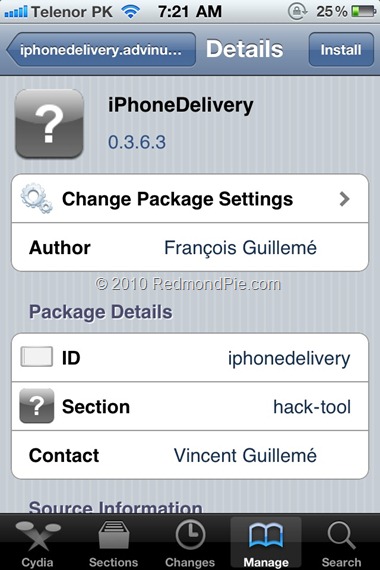
Step 6: After installation is completed. Search for “iPhoneDelivery” in Cydia and install this application. This app apparently fixes both the FaceTime and MMS issue.
Cydia iPhone 4 (3)
Let us know how this one goes for you in the comments section below. [Thanks Ran Cohen for the share on Redmond Pie’s Facebook Fanpage]


UPDATE 1: JailbreakMe has been updated which has fixed all the problems related to FaceTime and MMS. If you are doing a fresh jailbreak, you will not have any of these issues. Existing users will need to do a “Complete Upgrade” of Cydia followed by a reset of Network Settings. To do this, simply fire up Cydia and let the loading to finish. It will now automatically ask you to update Cydia. Touch on “Complete Upgrade” and reboot the device once it is done. Go to Settings –> General –> Reset –> Reset Network Settings. Reboot the device again. The problem should be fixed now.

You can follow me on twitter to keep yourself updated on all the latest iPhone jailbreaking and unlocking releases.


Source: redmondpie

Jailbreak iOS 4.0.1 on iPhone 4, 3GS New Bootrom with JailbreakMe 2.0 Star [How to Guide Video]


The iPhone Dev-Team (Comex) has released JailbreakMe 2.0 (aka Star) which can jailbreak all iOS devices on their latest respective firmware like iOS 4.0 / 4.0.1. This does not work with iOS 4.1 Beta release. Since JailbreakMe 2.0 is a userland jailbreak, what this means is that you run it right in your iOS Safari browser to jailbreak the device. It cant get simpler than that !

iPhone 4 Jailbreak
The following step by step instructions, along with video are for iPhone 4iPhone 3GS(New bootrom / old bootrom) and iPhone 3G users. One thing which is important to note here is that this jailbreak tool doesn’t hacktivate your device. You will need an original supported SIM card to activate your phone with iTunes. If you don’t have an original SIM, you can follow the instructions in this video guide posted here to activate your phone without having the original SIM card.
Step 1: Start iTunes and backup everything from Contacts, Calendars, Photos, Videos and Apps.
Step 2: Update your iPhone 4, 3GS or iPhone 3G on the latest iOS 4.0.1 firmware with iTunes. Download links for the firmware and iTunes 9.2.1 can be found below.
Step 3: Once you are done with the update, make sure you are connected to a WiFi network. I haven’t tested it on 3G so I recommend using it on a reliable WiFi network.
Step 4: Open Safari on your iPhone 4, 3GS or 3G and navigate to http://jailbreakme.com.
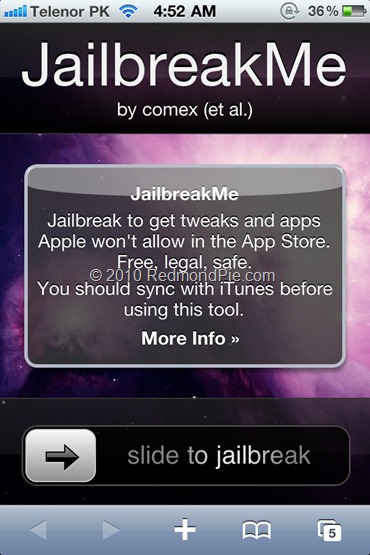
Step 5: “Slide to Jailbreak” to begin the jailbreak process.
iPhone 4 JailbreaMe 2.0 Star (1)
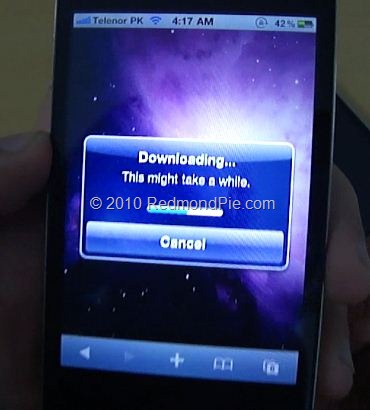
Step 6: Wait till the jailbreak tool download the required files..
iPhone 4 JailbreaMe 2.0 Star (3)
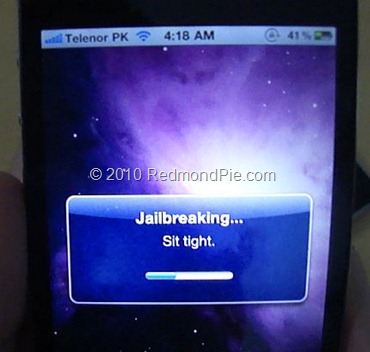
Step 7: Once the download is completed, it will automatically start the jailbreak process. Just don’t do anything silly at this point. Wait till the jailbreak process is completed.
iPhone 4 JailbreaMe 2.0 Star (4)
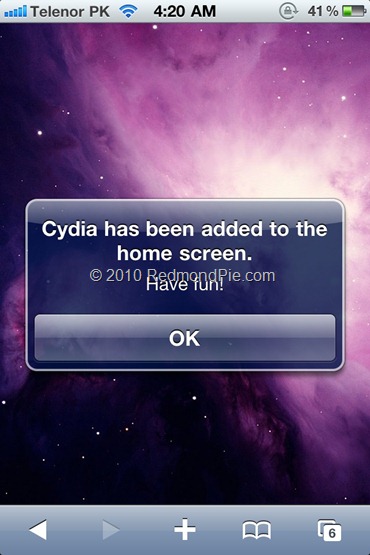
Step 8: Once done, you will be greeted with the following message.
iPhone 4 JailbreaMe 2.0 Star (2)
Step 9: Close the browser and look for Cydia. You should now have it on your phone!
Here is the video, showing all the above instructions in detail:
*video is processing, it will show up as soon as it is done..*
Make sure you subscribe to our Youtube Channel here for future videos related to iPhone, Android and Windows phones.
How to Unlock on iOS 4 / 4.0.1 (Any Baseband):

  • iPhone 3GS / 3G: Simply follow the step by step guide posted here to unlock your iPhone so that you can use it with any carrier you like. It is supported on all basebands upto 05.13.04.
  • iPhone 4: Wait for the iPhone Dev-Team to release the updated Ultrasn0w which can unlock it on this latest firmware.
Download iTunes 9.2.1
Download iOS 4.0.1 for iPhone 4, 3GS and 3G
UPDATE 1: Want to jailbreak your iPod touch 3G or iPod touch 2G MC Model? Follow the step by step guide posted here!
UPDATE 2: Those of you who are having problems with FaceTime and MMS should follow the steps posted here to fix the issue.

You can follow me on twitter to keep yourself updated on all the latest iPhone jailbreaking and unlocking releases.

Source: redmondpie

Jailbreak iPhone 4, 3GS, 3G on iOS 4 / 4.0.1 and iPad on iOS 3.2.1 with JailbreakMe 2.0


JailbreakMe 2.0 Star is the name! – The userland jailbreak for iPhone 4, iPhone 3GS, 3G on iOS 4 / 4.0.1, iPod touch on iOS 4, and iPad on iOS 3.2.1 is out !!. It is a browser basedjailbreak, all you have to do is to browse to http://jailbreakme.com from your iOS device tojailbreak it. Servers are probably thrashed right now. Keep trying until you successfully load the page. We will be back with quick how-to guides soon. Stay tuned for that !!

JailbreakMe
UPDATE 1: Full list of supported devices is as follows [Thanks to Daniel Le for posting this on Redmond Pie’s Facebook fanpage]
iPod 1G on 3.1.2
iPod 1G on 3.1.3
iPod 2G on 3.1.2
iPod 2G on 3.1.3
iPod 2G on 4.0
iPod 3G on 3.1.2
iPod 3G on 3.1.3
iPod 3G on 4.0
iPad on 3.2
iPad on 3.2.1
iPhone 3G on 3.1.2
iPhone 3G on 3.1.3
iPhone 3G on 4.0
iPhone 3G on 4.0.1
iPhone 3G[S] on 3.1.2
iPhone 3G[S] on 3.1.3
iPhone 3G[S] on 4.0
iPhone 3G[S] on 4.0.1
iPhone 4 on 4.0
iPhone 4 on 4.0.1
UPDATE 2: Early reports confirms that this new jailbreak is breaking FaceTime and MMS. We will let you know as soon as we have more on this.
UPDATE 3: Complete How-to Guide to Jailbreak iPhone 4, iPhone 3GS (New Bootrom) with JailbreakMe 2.0 (Star) Is up! Follow all the instructions posted here.
UPDATE 4: Complete How-to Guide to Jailbreak iPod touch 3G and iPod touch 2G MC Model with JailbreakMe 2.0 (Star) Is up! Follow all the instructions posted here.
UPDATE 5: Those of you who are having problems with FaceTime and MMS should follow the steps
posted here to fix the issue.

Source: redmondpie

Wednesday, January 13, 2010

iPhone 4G With Dual Core and OLED Screen in April

Korea Times indicates that Apple may launch its fourth generation iPhone as early as April. Korea Times published that KT Telecom is saying that the iPhone 4G could arrive as early as April of this year. KT Corp. is the second largest cellular service company in South Korea, behind number one SK Telecom, based on the number of subscribers.The KoreaTimes has heard that talks over sales volumes are underway and that KT is set to sell the new devices to its bigger local corporate clients as a "litmus test" in April. It plans to provide the new iPhones to local distributors in June.


According to Korea times : "We don’t see any bigger hurdle to introduce 4G iPhones here, as legal issues were completely cleared. It’s possible to launch the devices within the first half," a high-ranking KT executive told The Korea Times, asking not to be identified.
"Still, there are some 3G iPhone stocks. But KT and Apple have reached a broad consensus to introduce the advanced models as early as possible," according to the executive.


Korea Times also revealed some of the features of upcoming iPhone :
  • ARM Cortex A9 dual core processor
  • PowerVR SGX545 graphic chip
  • Organic light emitting diode (OLED) screens
  • Video chat
  • Removable battery (most probably)
  • High resolution screen
About PowerVR SGX545 graphic chip : Imagination Technologies, the official supplier of GPUs for iPhone, has introduced the new PowerVR GPU SGX545. The new GPU boasts very good performance, in fact, DirectX 10.1, OpenGL 3.2 and OpenCL 1.0, and can handle up to 40 million polygons per second (1 Gpixels / sec) up to 200MHz, up from 28 million ’s Current iPhone 3GS (almost 2 times faster).
Note: The information contained in this article are the result of rumors, we can not confirm nor deny these rumors, but information comes from a respective source so we are sharing with you.
Source ihackintosh