5% Off Powermat

Join The Community

Showing posts with label Firmware. Show all posts
Sunday, February 7, 2010

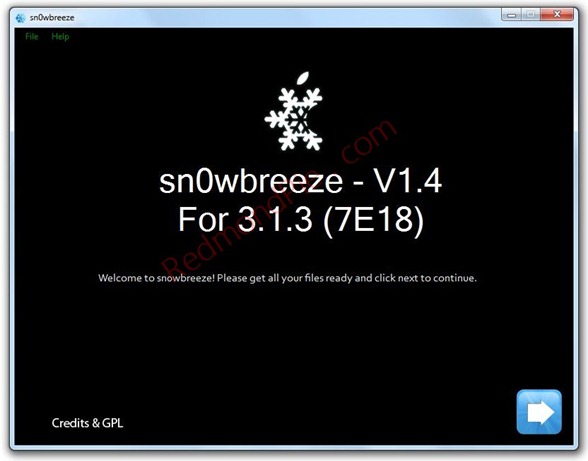
Download Sn0wbreeze V1.4 to Jailbreak iPhone 3.1.3 Firmware


The final version of Sn0wbreeze 3.1.3 V1.4 is now available for download. This minor update fixes the iPhone 3GS issue which was hampering users in the last release. It also brings support for iPod touch 1G. For those of you who don’t know, Sn0wbreeze is a jailbreaking tool like blackra1n, redsn0w and PwnageTool for iPhone and iPod touch which can be used to create custom .ipsw files. But unlike the PwnageTool, Sn0wbreeze is fully compatible to work with Windows 7/Vista and XP machines.
Sn0wbreeze V1.4
Sn0wbreeze supports jailbreaking on iPhone 2G/3G/3GS(old bootrom and non-MC) and iPod touch 1G. iPod touch 2G and 3G are not supported at the moment. Instructions for jailbreaking using sn0wbreeze are exactly similar to the last release. Follow the complete step by step guide posted here to jailbreak your iPhone and iPod touch using sn0wbreeze 3.1.3 V1.4. Once you are done with jailbreak, you can then unlock your iPhone 3G and 3GS using ultrasn0w or blacksn0w.
Alternatively, you can follow our complete jailbreaking guide for iPhone 3.1.3 2G and iPod touch 1G/2G using redsn0w 0.9.3 and using redsn0w 0.9.4 for iPhone 2G, 3G and iPod touch 1G/2G.
For iPhone 3.1.2 firmware, you can use blackra1nPwnageToolredsn0wsn0wbreeze,ultrasn0w and blacksn0w to jailbreak and unlock your iPhone and iPod touch.

Download the Original iPhone OS 3.1.3 firmware for iPhone 
Download .NET Framework 3.5 (required to run Sn0wbreeze) 
Download Sn0wbreeze for Windows [Fast Mirror Link]


You can follow me on twitter or join our facebook fanpage to keep yourself updated on all the latest iPhone jailbreaking and unlocking releases.

Source: redmondpie
Wednesday, February 3, 2010

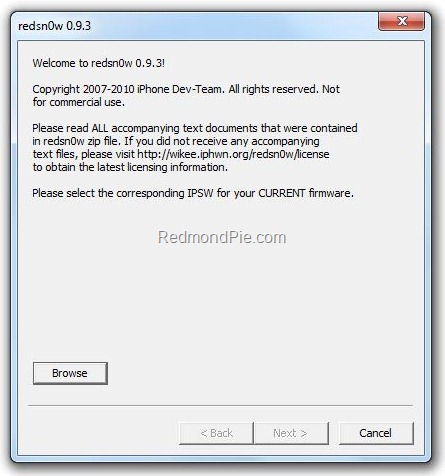
Jailbreak iPhone 3.1.3 Firmware with redsn0w 0.9.3


The newly released iPhone 3.1.3 firmware for iPhone and iPod touch updates baseband to 05.12.01 on iPhone 3GS and iPhone 3G, hence making it impossible for these two devices to get unlocked using blackra1n with blacksn0w. Fortunately for iPhone 2G (the first generation iPhone with EDGE) users, the baseband remains intact. The iPhone DevTeam has just confirmed that their newly released jailbreaking tool called redsn0w 0.9.3 can be used to jailbreak and unlock iPhone 2G on firmware 3.1.3, provided that you have jailbroken it previously at least once.

[UPDATE: Redsn0w 0.9.4 is now available. Please read the update note below.]
Jailbreak iPhone 3.1.3
NOTE: This guide is for iPhone 2G Only. Jailbroken and unlocked iPhone 3GS, 3G and iPod touch users should NOT upgrade until further instructions.
Follow the simply step by step instructions below to jailbreak and unlock iPhone 2G on 3.1.3 firmware.
Step 1: Update to original iPhone 3.1.3 firmware via iTunes. Downloading and installation instructions for iPhone 3.1.3 firmware can be found here.
Step 2: Start redsn0w 0.9.3 and point it to the original iPhone 3.1.2 firmware to proceed. This is required because redsn0w 0.9.3 can not read or validate iPhone 3.1.3 firmware.
Step 3: Now select both “Install Cydia” and “Unlock” options.
Step 4: Now make sure your device is both OFF and PLUGGED IN to the computer before you click “Next”.
At this stage you will be presented with a screen where you will have to quickly hold “Power” button and then while holding the “Power” button, you will now have to hold “Home” button too. Now after few seconds release “Power” button but keep holding “Home” button until installation begins.
Step 5: Sit back and enjoy while redsn0w will do all the rest for you. Once done, your iPhone 2G will restart automatically and you will find it jailbroken with iPhone firmware version 3.1.3.
Step 6: Once you are done with the jailbreak, you can now unlock your iPhone 2G running jailbroken firmware 3.1.3 by using BootNeuter app from Cydia. Follow the instructionsfrom Step 4 here to unlock iPhone 2G on 3.1.3 firmware.
Disclaimer: This guide is for testing & educational purposes only. I’m not responsible for any loss of important data or malfunctioning of your iPhone.
For iPhone 3G and 3GS Users: We strongly suggest that you stay away from this official upgrade until and unless the DevTeam or George Hotz releases new jailbreaking and unlocking tools for 3.1.3 firmware. We will let you know when it will happen. In the meantime you can follow our complete jailbreaking and unlocking guide for iPhone 3.1.2firmware using blackra1nPwnageToolredsn0wsn0wbreezeultrasn0w and blacksn0w.
UPDATE 1: Redsn0w 0.9.4 is LIVE! Download links and jailbreaking instructions can befound here.
Download iTunes 9.0.3 for Windows and Mac
Download the Original iPhone OS 3.1.3 firmware for iPhone
Download the Original iPhone OS 3.1.2 firmware for iPhone
Download redsn0w 0.9.3 for Windows [Fast Mirror link]
Download redsn0w 0.9.3 for Mac [Fast Mirror link]

You can follow me on twitter to keep yourself updated on all the latest iPhone jailbreaking and unlocking releases.

Source: redmondpie
Jailbreak iPhone 3.1.3 Firmware


Apple today has released the new iPhone 3.1.3 firmware for iPhone and iPod touch. This release is just a minor upgrade over the last firmware and it mostly brings stability and bug fixes for iPhone 3GS, 3G, 2G and iPod touch. Interestingly, this (version 3.1.3) isn’t the same version which runs on the newly released Apple iPad (OS 3.2).

Jailbreak iPhone 3.1.3
If you currently rely on your jailbreak and unlock for iPhone 3G and 3GS, we highly recommend you not to upgrade to this new firmware unless and until new tools are made available from the likes of George Hotz and the iPhone DevTeam.

Jailbreak iPhone 2G and iPod touch 1G (Read the UPDATE note below) 
iPhone 2G (the original iPhone EDGE) and iPod touch 1G/2G(older models only) can be jailbroken with redsn0w 0.9.3. Follow the complete step by step guide posted here to jailbreak iPhone 2G on firmware 3.1.3, and here to jailbreak iPod touch 1G/2G(older models) on firmware 3.1.3. Note: This does NOT apply to iPhone 3GS, 3G and iPod touch 3G.

We’ll let you know whenever a workable solution is released for jailbreaking and unlocking this latest firmware on iPhone 3GS, 3G and iPod touch 2G(newer model) and 3G. In the meantime, iPhone 3GS, 3G and iPod touch 2G/3G users can follow our complete jailbreaking and unlocking guide for iPhone 3.1.2 firmware using blackra1nPwnageTool,redsn0wsn0wbreezeultrasn0w and blacksn0w.
Info on unlocking for iPhone OS 3.1.3 firmware can be found here.
UPDATE 1: Redsn0w 0.9.4 is LIVE! Download links and jailbreaking instructions can befound here.
Also don’t forget to check out our iPhone Activity Center and iPhone Apps Gallery for all the latest news, views and reviews on iPhone and iPod touch.

Download iTunes for Windows and Mac 
Download iPhone OS 3.1.3 Firmware for iPhone and iPod touch


You can follow me on twitter to keep yourself updated on all the latest iPhone jailbreaking and unlocking releases.

Source: redmondpie

Tuesday, December 15, 2009

iPhone 3.1.3 Firmware Release Imminent

While analyzing their website logs, BGR has found out something very interesting, related to the upcoming iPhone OS firmware release. Their server logs have clearly shown existence of both iPhone 3.1.3, and the major release – the iPhone 4.0 firmware. While we don’t know what new features the new firmware will offer, one thing is for sure that iPhone 3.1.3 firmware is only going to be a minor release for bug fixes and patches. iPhone 4.0 seems to be the major release version that is most probably going to hit something in summer of 2010 with the next-gen iPhone model.


Expect iPhone 3.1.3 firmware version to drop any time via iTunes. If you are using ajailbroken or an unlocked iPhone with firmware 3.1.2, then do not update to OS 3.1.3 immediately or you may loose the capability to jailbreak or unlock your device in the future. You have been warned!


You can follow me on twitter to keep yourself updated on all the latest iPhone related releases.


Source: redmondpie

Monday, October 26, 2009

Jailbreak iPhone 3.1.2 Firmware with blackra1n RC2


blackra1n RC2 is Live! George Hotz (aka geohot) has released an update to his already popular jailbraking tool named blackra1n which can jailbreak all iPhone’s (2G/3G/3GS) and iPod touches (1G/2G/3G) running iPhone firmware 3.1.2. Here’s what new in blackra1n RC2:

  • Fixed all issues that you might had when jailbreaking iPhone 3G with blackra1n RC1.
  • Tethered jailbreak for 3.1 OOTB iPod touch 8GB and all the new iPhone 3GS’s.
  • Fixed Icy issues.
  • Works on both Windows and Mac.
So, what is blackra1n? blackra1n is a 30 second ALL device 3.1.2 jailbreak. Even the ipt3, but the ipt3 is tethered. In order to boot it, just rerun blackra1n.
Jailbreaking instructions are exactly same as it were with blackra1n RC1. Please refer to our step-by-step guides posted below on how to jailbreak iPhone 2G/3G/3GS and iPod touch 1G/2G/3G with blackra1n RC2:

  • How to: Jailbreak iPhone 2G/3G/3GS and iPod touch 1G/2G/3G running iPhone 3.1.2 Firmware with blackra1n
If you liked this, then you may also like to check out the following guides:
You can follow me on twitter to keep yourself updated on all the latest iPhone jailbreaking and unlocking releases.
Download iPhone Firmware 3.1.2
Download blackra1n RC2 for Windows and Mac OS X

Source: redmondpie

Monday, October 19, 2009

Jailbreak iPhone 3.1.2 Firmware with blackra1n


George Hotz (aka geohot), the kid who was the first to unlock the original iPhone back in 2007 and then iPhone 3GS in July of this year is back! This time he is the first one to release jailbreaking solution for the new iPhone 3.1.2 Firmware for all devices through his new tool called blackra1n. blackra1n is a software tool which can jailbreak (not unlock) all iPhone’s (iPhone (Edge), iPhone 3G and iPhone 3GS) and iPod touch’s (iPod touch 2G and 3G) running on firmware version 3.1.2. blackra1n is currently for Windows only, a Mac version of this app can be expected soon.
So, what is blackra1n? blackra1n is a 30 second ALL device 3.1.2 jailbreak. Even the ipt3, but the ipt3 is tethered. In order to boot it, just rerun blackra1n.
blackra1n - Jailbreak for iPhone 3.1.2 FirmwareImage via ModMyi
Follow the steps below to jailbreak all iPhone’s and iPod touches on OS 3.1.2:
Note for iPhone 3G and 3GS: Do NOT upgrade to iPhone 3.1.2 yet if you want to keep your unlock as doing so will result in upgrade of your baseband which will make it almost impossible for you to unlock.
Step 1: Download and install the latest version of iTunes (download link given below).
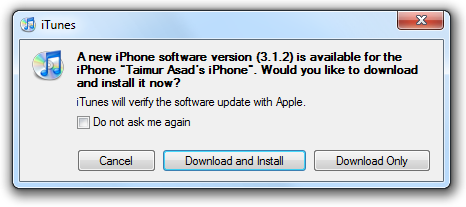
Step 2: You will now need to first update/restore to the original iPhone OS firmware 3.1.2 on your iPhone by using the latest version of iTunes. Download link for iPhone Firmware 3.1.2 is given at the end of the post.
iPhone OS Firmware 3.1.2
Step 3: Download blackra1n for Windows (download link at the end of the post).
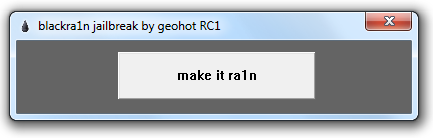
Step 4: Start blackra1n app. If you are on Windows 7 or Vista, run the app with “Windows XP Compatibility” mode by enabling it from the “Properties” tab to avoid any errors during the jailbreak process.
Step 5: Click on “make it ra1n”:
blackra1n
Step 6: Let the app do its thing and wait for the phone to automatically reboot.
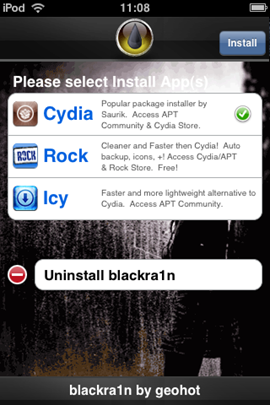
Step 7: You should now have “blackra1n” in the list of applications on your iPhone. Run “blackra1n”, download Cydia and let it install it.
blackra1n
blackra1nImage Credit: elmarseillais
Step 8: Finally reboot your iPhone. Voila! You should now have fully jailbroken iPhone or iPod touch running on firmware 3.1.2.
UPDATE 1: PwnageTool 3.1.4 has been released which can Jailbreak iPhone on 3.1.2 while keeping its baseband intact to 04.26.08. Complete step-by-step jailbreaking guide for Mac OS X can be found here and for Windows here. Unlocking guide for iPhone 3G and 3GS on 3.1.2 firmware can be found here.
UPDATE 2: blackra1n is now available for Mac OS X as well. Download link plus complete step-by-step instructions guide on how to jailbreak iPhone/iPod touch using blackra1n on Mac OS X can be found here.
UPDATE 3: Follow the step-by-step guide posted here to fix missing carrier name or logo on your unlocked and jailbroken iPhone 3G/3GS running firmware 3.1.2.
UPDATE 4: Follow the step-by-step guide posted here to Enable Tethering on iPhone 3.1.2 Firmware.
UPDATE 5: You may also like to check out How to: Patch MobileInstallation File on iPhone 3.1.2 Firmware.

Download iPhone firmware here
or
Download iPhone OS 3.1.2 for iPhone 2G
Download iPhone OS 3.1.2 for iPhone 3G
Download iPhone OS 3.1.2 for iPhone 3GS

Download blackra1n for Windows

Source: redmondpie

AppSync for iPhone 3.1.2 Jailbreak Firmware


AppSync patches MobileInstallation file on iPhone OS 3.x which is needed in order to install .ipa files manually without using iTunes. A new version of AppSync has now been released which is compatible with the latest iPhone 3.1.2 firmware. Make sure you havejailbroken your iPhone with firmware 3.1.2 before following the steps below. Complete step-by-step guide on how to jailbreak your iPhone with firmware 3.1.2 can be foundhere.
Here’s what you have to do to patch the mobileinstallation file on your iPhone:
Step 1: Start “Cydia” on your iPhone.
Step 2: Touch on “Manage” tab on the bottom.
Step 3: Now touch on “Sources” as seen in the screenshot below:

Step 4: Touch on “Edit”, and then on “Add”. You should now be prompted to enter a url source as seen in the screenshot below. Type “http://apt.macosmovil.com” and click on“Add Source”.


Cydia will now automatically update your sources by following a series of automated steps as shown in the screenshots below:


Step 5: After installation is completed. Search for “AppSync para OS 3.1(3.1.2)” in Cydia and install this application. This app will automatically patch mobileinstallation file on your iPhone running firmware 3.1.2.

You should now be able to install .ipa files manually on your iPhone running firmware 3.1.2.
UPDATE 1: Upon further investigation, I have found out that the original file version of “AppSync for OS 3.1(3.1.2)” which is posted at macosmovil repository is basically the same (v1.0) as the one posted earlier for OS 3.1, and both are compatible to work with iPhone OS 3.1.2.

Source: redmondpie

Sunday, October 11, 2009

Downloads | Jailbreak | Unlock | Firmware | IPSW-Files | iPhone | iPod-Touch


Here are some important download links for the Apple iPhone and the iPod touch. These are firmwares, jailbreaking tools and bootloaders that you shall require.
Once you have downloaded the firmware (.ipsw file) require you can simply press shift+Restore/Update button (option+Restore/update for Mac) in iTunes. A file dialog will open and let you choose the downloaded ipsw file. Downloading the file manually lets you chose the version you want to load instead of the latest version that iTunes will load by default.
Update Firmware
.IPSW Firmware files for the iPhone ‘3GS’ / ‘3G s’ (third generation)
.IPSW Firmware files for the iPhone 3G (second generation)
.IPSW Firmware files for the iPhone 2G (first generation)
.IPSW Firmware files for the iPod touch 1G (first generation)
iPod touch firmware v3.0 {iPod touch 1G (3.0/7A341)}
iPod touch firmware v2.2.1 {iPod touch 1G (2.2.1/5H11)}
.IPSW Firmware files for the iPod touch 2G (second generation)
iPod touch 2G firmware v3.0 {iPod touch 2G (3.0/7A341)}
iPod touch 2G firmware v2.2.1 {iPod touch 2G (2.2.1/5H11a)}
Jailbreaking and Unlocking Tool Downloads
The bootloaders are generally useful while jailbreaking / unlocking the old iPhone 2G aka First generation.

or
BootLoader
QuickPwn
Pwnage
Winpwn
Ziphone
iLiberty