5% Off Powermat

Join The Community

Showing posts with label Save SHSH. Show all posts
Saturday, December 4, 2010

How to Save SHSH Blobs Directly From iPhone, iPad, iPod touch Using iSHSHit


iSHSHit is a new Cydia app that is an alternative to Tiny Umbrella. It lets you save and backup SHSH blobs directly off your iOS device. It also has the original functionality of being able to send your saved SHSH blobs via email, which is a very handy feature. It also automatically uses the Cydia On-File service, meaning that your SHSH blobs will also be saved on the Cydia servers.

Thursday, November 4, 2010

Save iOS 4.1 SHSH Blobs Now to Ensure an Untethered iOS 4.2 Jailbreak


Apple has already seeded the final Gold Master version of iOS 4.2 to developers. Public release is looming near. Once the new firmware is out, Apple will stop signing the old firmware, which will make it impossible for you to get SHSH blobs for iOS 4.1.

Sunday, June 27, 2010

How to Save iPhone 4 SHSH Blobs (ECID SHSH) on iOS 4


TinyUmbrella has been updated to support iPhone 4 (running iOS 4). It is important to save SHSH Blobs (ECID SHSH) files of your iPhone 4 now because of all the rumors going around regarding a new firmware update, which could be released as early as next week. If you have your SHSH blobs on file, you can downgrade anytime to iOS 4 from iOS 4.01should you need to.

iPhone 4
Some important notes for iPhone 4 SHSH blobs before you proceed.
If you desire to restore your iPhone 4 to iOS 4, make sure you uninstall Wi-Fi Sync before trying to do so.
In order to obtain your SHSH you MUST have the device attached.
Restores on the iPhone 4 are not perfect. They error out locally but the restore does complete – it just needs to be helped along. (Much like downgrades where the baseband update fails). I’ll try to put the functionality in TinyUmbrella to fix this.
For Mac users: Copy the app OUT OF THE DMG. The reason you are getting the repeating password prompts is because you ran the app from within the DMG. This is bad. Copy it anywhere and you’ll be fine.
TinyUmbrella
From here onwards, you can simply follow the steps that i have posted here for iPhone 3GS and iPod touch. These steps are essentially the same for iPhone 4 except for some of the notes that I have posted above. Oh and if you want to learn more about what SHSH blobs or ECID SHSH files are, you can do so by reading one of my old article posted here.
Download TinyUmbrella (Windows)
Download TinyUmbrella (Mac OS X)
You may also like to check out:
You can follow me on twitter to keep yourself updated on all the latest jailbreaking and unlocking releases.

Source: redmondpie

Wednesday, June 23, 2010

Save SHSH Blobs (ECID SHSH) of iOS 4 on Windows and Mac


TinyUmbrella has been updated to support the new iOS 4 on iPhone 3GS and iPod touch 2G/3G. iPad is also supported but iOS 4 for iPad isn’t available yet. iPhone 3G is not supported because you don’t need to save SHSH blobs for iPhone 3G, and older iPod touch (non MC model).
This is important if you want to jailbreak (by downgrading) your device again should Apple patches the exploit used by the new unlock and jailbreak tools. It is also important to note that you wont be able to save SHSH blobs once Apple has released the new firmware (iOS 4.0.1 / iOS 4.1). This is because Apple will stop signing the iOS 4 firmware once the new one has been released, hence negating you to save your iOS Device SHSH files.
Use the step by step guide posted below to save your SHSH blobs (ECID SHSH) of iPhone 3GS, iPod touch 2G/3G on iOS 4 without having to jailbreak your device.
Step 1: Download the latest beta version of TinyUmbrella for WindowsMac or Linux.
Step 2: Make sure you are running iTunes > 9.0. iTunes 9.2 is recommended.
Step 3: Start the program and plug in any ONE of the supported iDevices (iPhone/iPad/iPod touch).

SHSH Blobs iOS 4
Step 4: Click on “Save My SHSH”. TinyUmbrella will now grab the signature for you.
SHSH Blobs iOS 4 (1)
It will be enabled again once a ticket has been generated to save it to saurik’s server.
SHSH Blobs iOS 4 (2)
This is it ! You should be safe now. Make sure you save the signature for your iPhone, iPad and iPod touch on file before Apple releases the next firmware.
You may also like to check out:
You can follow me on twitter to keep yourself updated on all the latest jailbreaking and unlocking releases.

Source: redmondpie

Tuesday, June 8, 2010

Save SHSH Blobs (ECID SHSH) of iPhone 3.1.3 and iPad 3.2


Since Spirit jailbreak release is on the horizon, it is time to save your SHSH blobs so that you can jailbreak (by downgrading) your device again should Apple release a new firmware once the exploit is public. The following two paragraphs explains what are SHSH blobs and why is it important to save them now.
So first up, what exactly is SHSH blob or ECID SHSH? Well, it is basically is a unique signature which is checked against Apple servers whenever you decide to restore the firmware on any of your iDevice (iPhone, iPad and iPod touch). Once a new firmware is released, Apple stops signing the older firmware, hence making it impossible to restore back to the older firmware from iTunes.
Now to “why is it important to save SHSH blob”: The creator of Cydia has setup a new server which basically mimics Apple’s verification server and can save your older signature (SHSH blob) so that you can downgrade or restore back to the older firmware. This isimportant because if you don’t have your SHSH blob saved, and accidently update to new firmware, you’ll loose your jailbreak and furthermore, you wont be able to downgrade back to older firmware to re-jailbreak your device.


Since Spirit is a userland jailbreak, the exploit it uses is very likely going to be patched in the form of new firmware. It is important to save your iPhone / iPad / iPod touch SHSH blobs now so that you don’t loose the ability to downgrade (and re-jailbreak) your device should you accidently upgrade.
There are number of ways you can do this. You can either use AutoSHSHFirmware Umbrella or directly go through saurik’s server. The following guide uses AutoSHSH to save SHSH blobs of iPhone, iPad and iPod touch.
Step 1: Download the latest version of AutoSHSH. (Download link).
Step 2: Start the program and plug in any ONE of the iDevices (iPhone/iPad/iPod touch) in recovery mode. To do this, turn off your device and hold down the “Home” button while connecting the USB cable until you see “Connect to iTunes” message and logo on your iPhone.
SHSH Blobs
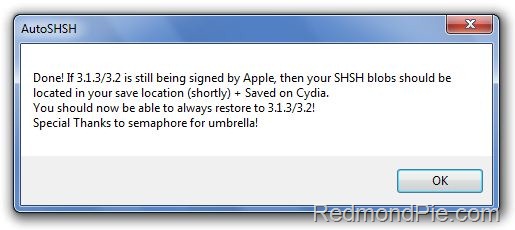
Step 3: Click on “Grab my SHSH Blobs Automatically”. AutoSHSH will now grab the signature for you. Once done, it will ask you to save it locally. Make sure you keep it in a safe place as you might need it when you want to downgrade back to the older firmware. AutoSHSH will also automatically upload the signature file to saurik’s server.
SHSH Blobs (1)
This is it ! You should all be safe now. Spirit jailbreak release is imminent now. Make sure you save the signature for your iPhone, iPad and iPod touch on file before Apple update the iOS 4.


You can follow me on twitter to keep yourself updated on all the latest from Apple.

Source: redmondpie