5% Off Powermat

Join The Community

Showing posts with label Blacksn0w. Show all posts
Sunday, March 28, 2010

Blacksn0w RC2 Final for Unlocking iPhone 3.1.3 Baseband 05.11.07 is Now LIVE!


The final version of Blacksn0w RC2 is now available on Cydia. This version brings fix for WiFi loss, and boot loops issue which was hampering users in the last ‘test’ release. For those of you who don’t know, blacksn0w RC2 is basically a repackaged version of theoriginal unlock released by geohot, and the fix which was recently released by MSFT Guyfor 05.11.07 baseband on iPhone OS 3.1.3.

Blacksn0w RC2 Final
The installation instructions for blacksn0w RC2 (Final) are exactly similar to the last release. Simply follow the step by step guide posted here to unlock iPhone 3GS/3G, on iPhone 3.1.3 05.11.07 Baseband using blacksn0w RC2 version 1.0.

You can also check out our complete jailbreaking guides for iPhone 3.1.3 firmware for iPhone 2G, 3G, 3GS and iPod touch 1G/2G using redsn0w 0.9.3redsn0w 0.9.4,sn0wbreezePwnageTool 3.1.5. Unlocking can be done using ultrasn0w or blacksn0w.

For iPhone 3.1.2 firmware, you can use blackra1nPwnageToolredsn0wsn0wbreeze,ultrasn0w and blacksn0w to jailbreak and unlock your iPhone and iPod touch.

You can follow me on twitter to keep yourself updated on all the latest jailbreaking and unlocking releases.

Source: redmondpie

Wednesday, March 24, 2010

Unlock iPhone 3GS OS 3.1.3 Baseband 05.11.07 with Blacksn0w


Good News for those who are stuck on iPhone 3GS OS 3.1.3 / Baseband 05.11.07 and can’t downgrade to earlier versions because they didn’t saved their Cydia SHSH. MSFTGuyand PushFix fixed the Blacksn0w and firmware 3.1.3 issue and now this unofficial patched version of blacksn0w is available on PushFix Cydia repo. This modified version of blacksn0w adds support for phones running 3.1.3 with 05.11.07 baseband (phones upgraded with PwnageTool or Sn0wbreeze). It also fixes a small bug that appears to make WiFi much more stable

Note : Needless to mention but if you updated your 3.1.2 or less OS to 3.1.3 stock firmware you are out of luck because your Baseband is updated to 5.12.01 and latest BB is incompatible with Ultrasn0w/ Blacksn0w. MSFTGuys patched release is for BB 05.11.07 only.
Download Installation Instructions
Blacksn0w RC2 will be available on MMI repo very soon, if you are impatient one then you can add the source ” http://cydia.pushfix.info/ ” to Cydia and install it now. The package is called " blacksn0w RC2 "
Warning : Blacksn0w for 3.1.3 is still in RC stage and there may be some issues or bugs, for example, if you are faking your OS version to be 3.1.3 and you install the 3.1.3 version of blacksn0w RC2 with 3.1.2 CommCenter, you will cause problems! Your cell and WiFi could be unresponsive until you either uninstalled the package again via Cydia or restored the phone. So if you haven’t left any other option only then go for this release.
Stay tuned with us for your daily dose of iPhone news, you can follow us on twitter via @iTune2iPhone and keep your self updated with the latest of iPhone community.
Source: ihackintosh

Sunday, February 7, 2010

Unlock iPhone 3.1.3 3G 3GS with blacksn0w


Sn0wbreeze 3.1.3 is now available for download which can jailbreak iPhone 2G, 3G and iPhone 3GS (old bootrom only) on iPhone OS 3.1.3. We have already published a detailed guide on how to jailbreak using Sn0wbreeze and unlock using ultrasn0w. Ultrasn0w unlock is for iPhones with baseband 04.26.08 baseband. If you are on 05.11.07 baseband, then you may use Geohot’s blacksn0w unlock which was released last year with blackra1n.
Follow the simple step by step guide below to unlock your iPhone 3G and iPhone 3GS (old bootrom only) on iPhone OS 3.1.3 using blacksn0w. iPhone 2G users should follow the guide posted here (Mac version of the guide here).

How to: Jailbreak iPhone on 3.1.3: 
Step 1: Follow the guide posted here to jailbreak your iPhone 3G or 3GS using Sn0wbreeze 3.1.3 on iPhone firmware 3.1.3.


How to: Unlock iPhone 3G/3G (old bootrom) on 3.1.3: 
Step 2: Once you are done with the jailbreak, you can now unlock your iPhone running jailbroken firmware 3.1.3 by using blacksn0w from Cydia. To do this:

  • Start “Cydia” on your iPhone.
  • Touch on “Manage” tab on the bottom.
  • Now touch on “Sources” as seen in the screenshot below:
Unlock iPhone 3.1.3
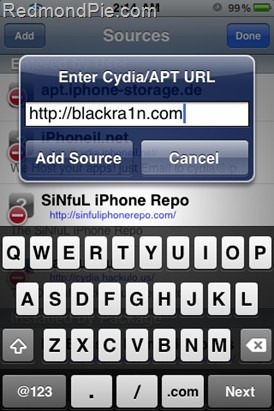
  • Touch on “Edit” and then on “Add”. You will be prompted to enter a url source as seen in the screenshot below. Type “http://blackra1n.com” and touch on “Add Source”.
Unlock iPhone 3.1.3
Cydia will now automatically update your sources by following a series of automated steps.
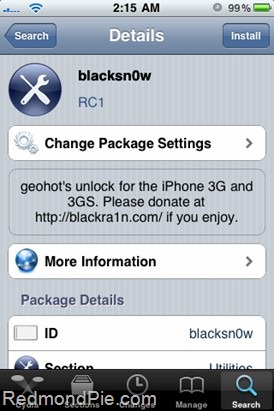
  • After installation is completed. Search for “blacksn0w” in Cydia and install this application. This app will automatically unlock your iPhone so that you can use it with any carrier.
blacksn0w 3.1.3
Step 3: Now simply restart your iPhone. Voila! You are now running a fully unlocked and jailbroken iPhone on firmware 3.1.3 on your iPhone 3G or 3GS.


You can follow me on twitter to keep yourself updated on all the latest iPhone jailbreaking and unlocking releases.

Source: redmondpie

Sunday, November 8, 2009

Fix No Wi-Fi, GPS and YouTube after Blackra1n Jailbreak

GeoHot released Blackra1n RC3 and Blacksn0w RC1 for jailbreaking and unlocking iPhone 3G/3GS with baseband 5.11.07, If you haven’t jailbroken yet then follow our guides for iPhone 3G 3GS Firmware 3.1.2 and for iPhone 2G Firmware 3.1.2 The process of jailbreak unlock is very easy but many user reported back us that they have broken Wi-Fi after jailbreaking their iPhones with blackra1n. Some folks also  reported  problems with GPS or YouTube after unlocking the iPhone with BlackSn0w.


Broken Wi-Fi Fix : There is an easy fix for all of this. All you have to do is to go to Settings>General>Reset> and hit Reset Network Settings. After resetting the network settings. Then reboot your phone and you should be fine.
Push Notifications Fix : Launch the cydia and add  the following repo “ http://cydia.iphoneil.net/ ” then search for  “ pushfix “ and install this patch. By doing this your push notification bug caused by blackra1n will be patched.
Thanks to Jane for dropping the tip


wifi
Some of our follower asked us they don’t have the working WiFI connection, so how can they unlock their iPhones with Blacksn0w without having WiFi connection. For them here is a workaround to Unlock iPhone 3.1.2 Blacksn0w Offline Without WiFi Cydia.

If you have any question we’ll love to hear back from you on twitter via @iTune2iPhone and keep your self updated with the latest of iPhone community.
Source: ihackintosh

Thursday, November 5, 2009

Unlock iPhone 3.1.2 Blacksn0w Offline Without WiFi Cydia

We care about each and everyone, Many of our followers on twitter reported us to have broken WiFi (not even fixed by resetting), Many reports they don’t have the working WiFI connection etc. etc. So they are not able to install blacksn0w on their iPhone. If you are following us from long you may noticed we published a hack to Unlock iPhone 3G OS 3.0 Without WiFi Cydia Now it’s time for Blacksn0w users sake, Here is the final solution, Blacksn0w RC1 Payload files which are ripped off from my phone and all you have to do is to place these two files on a specific location and reboot your phone. T-Mobile users please make sure to turn off 3G in settings before using any unlocking option. Before getting started read the complete article 2-3 times and follow the procedure with a cool mind.


_____________________________________________________________________________________
Offline Unlock Method one required Jailbroken iPhone
  • First of all jailbreak your iPhone 3G 3GS 3.1.2  with pwnage tool so you can access file system of iPhone. If you already have a pwned phone then follow the next step otherwise jailbreak first. Follow our previous guide to Jailbreak iPhone 3G 3GS on Windows with custom firmware.
Please note Blackra1n jailbroken phones don’t work with Diskaid until you install AFC2Add from Cydia. That’s why we recommend to jailbreak with pwnage tool. Also please note we can’t publish the custom firmware links so please don’t ask do a google.
  • Download and Extract the Blacksn0w to your Desktop. Download here or here, There are two files in the package first is blacksn0w.dylib and second is com.apple.CommCenter.plist
  • Download and Install DiskAid Here,Connect your phone to computer and launch DiskAid to explore file system of your phone.
  • In disk aid explore /usr/lib/ and place blacksn0w.dylib here, Now and put that plist file in System/Library/LaunchDaemons/ This should be as following.
  1. /usr/lib/blacksn0w.dylib
  2. /System/Library/LaunchDaemons/com.apple.CommCenter.plist

  • Now close the DiskAid and your phone will be unlocked after the reboot. For those who likes to play with .Deb file follow the following tutorial. Both guides are same first is manual and second is automatic. But both works fine.
____________________________________________________________________________________
Offline Unlock Method two required Jailbroken iPhone with SSH access
You can install blacksn0w.deb if you already jailbreaked and SSH your iPhone. If you are looking for an easy guide for How to Access iPhone via SSH on Windows Mac Check this one. Now download the blacksn0w.deb file from here.
How to Install Blacsn0w.deb (Method 1) :
  • SSH into iPhone – using WinSCP if your on Windows, Cyberduck if your on MacOS.
  • Copy .deb file into tmp folder
  • Quit Cydia if its running
  • Hit Ctrl+T in WinSCP and run the following command :
dpkg -i /tmp/blacksn0w.deb
  • After installation, you can delete the .deb file
How to Install Blacsn0w.deb (Method 2) :
  • SSH your iPhone and go to /var/root/Media/Cydia/AutoInstall Copy the .deb file there and that just reboot  your device. If  Auto install folder is not lying in /var/root/Media/Cydia then you can create urself
_____________________________________________________________________________________
If you have any question we’ll love to hear back from you on twitter via @iTune2iPhone and keep your self updated with the latest of iPhone community.
Source: ihackintosh

Wednesday, November 4, 2009

Download blacksn0w from Cydia for iPhone 3.1.2 Firmware

blacksn0w along with blackra1n RC3 were released earlier today which can jailbreak all iPhone’s & iPod touches, and can unlock iPhone 3G/3GS running on 3.1.2 firmware with 05.11.07 baseband. You can follow the following step-by-step tutorial/guide to unlock your iPhone 3G and iPhone 3GS with the latest iPhone 3.1.2 firmware using blacksn0w from Cydia. This unlocking guide applies to iPhone 3G and 3GS users who were already jailbroken on 3.1.2 firmware using PwnageTool 3.1.4 instead of blackra1n. Those of you with iPhone 2G should follow the guide posted here or here for unlocking and jailbreaking 3.1.2 firmware.
Those of you who are running iPhone 3.1.2 Firmware with 05.11.07 baseband should follow the guide posted here to jailbreak, and here to unlock iPhone 3G/3GS using blackra1n RC3.


How to: Jailbreak iPhone on 3.1.2: 

Step 1: Follow the guide here to jailbreak your iPhone 3G or 3GS using PwnageTool on firmware 3.1.2.

How to: Unlock iPhone on 3.1.2: 

Step 2: Once you are done with the jailbreak, you can now unlock your iPhone running jailbroken firmware 3.1.2 by using blacksn0w RC1 from Cydia. To do this:

  • Start “Cydia” on your iPhone.
  • Touch on “Manage” tab on the bottom.
  • Now touch on “Sources” as seen in the screenshot below:

Touch on “Edit” and then on “Add”. You will be prompted to enter a url source as seen in the screenshot below. Type “http://blackra1n.com” and touch on “Add Source”.

Cydia will now automatically update your sources by following a series of automated steps.


  • After installation is completed. Search for “blacksn0w” in Cydia and install this application. This app will automatically unlock your iPhone so that you can use it with any carrier.
Step 3: Now simply restart your iPhone. Voila! You are now running a fully unlocked and jailbroken iPhone on firmware 3.1.2 on your iPhone 3G or 3GS.
UPDATE 1: If you encounter issues with WiFi after unlocking with blacksn0w then you should try and reset your network settings by navigating to Settings –> General –> Reset –> Reset Network Settings and then reboot the iPhone.
You can follow me on twitter or to keep yourself updated on all the latest jailbreaking and unlocking releases.

Source: redmondpie

Jailbreak Unlock iPhone 2G 3.1.2 With Blackra1n Windows Mac

The Blackra1n RC3 software is available for both Windows and Mac (Tiger+PPC) users, and it supports  iPhone 2G, iPhone 3G, iPhone 3GS. Blackra1n RC3 is the most advanced and easy to use utility. Blackra1n RC3 includes the Blacksn0w “ unlock for the latest 05.11.07 baseband ” “ enable official tethering ” and a ” huge 15 second speed improvement ”.  We also apperitiate the stand of GeoHot to declining the $ 10K prize money from Jody Sander. We already published the Jailbreak Unlock iPhone 3G 3GS 3.1.2 with Blackra1nHere’s the guide that allows you to run the Jailbreak, activation and unlocking the phone part of all the EDGE.  Please note Blackra1n is just for jailbreak later we need a working WiFi connection to Install BootNeuter from Cydia.


_____________________________________________________________________________________
Guide to Jailbreak your iPhone
Step One. Download Blackra1n RC3 and double click the rain drop icon to launch the program. Windows 7 Vista users if you have any difficulty in launching the program follow the highlighted instructions otherwise jump to Step Two. I didn’t faced any problem with Windows 7so just in case if Blacksn0w crashes during the launch follow the following three steps otherwise Jump to Step Two.
  • Right-click the blackra1n icon and click properties.
  • Click the Compatibility tab.
  • Under compatibility mode click the box to enable it and select Windows XP (Service Pack 2). Click OK, and then run blackra1n.
Step Two. Click the make it ra1n button.


Step Three. You iPhone will now be placed in recovery mode. You will see a picture of GeoHot that replaces the regular recovery mode screen on your device.

Step Four. Your iPhone or iPod Touch will reboot once blackra1n is done doing it’s thing and you should see the blackra1n icon on there. If you don’t see the blackra1n icon, go to the last page on your iDevice and you should see it.

Step Five. Install Cydia from the blackra1n app. You have the option of choosing Cydia, and Rock. I don’t recommend you to install both of them at once, because that may cause problems. Install them one at a time then reboot and then second one.
Step Six. Open Cydia and run updates essential. Now search for “BootNeuter” and install the bootneuter app.When BootNeuter Starts make sure that the application has following configurations.

Step Seven : When you are ready click on the button “Flash” and after a few seconds you will have unlocked the phone part of your iPhone 2G a.k.a. iPhone EDGE
Warning do not interrupt the process of flashing : This may take some time before being completed, so you should have a little patience. Another tip while first syncing to itunes set your phone as new phone to avoid long run problems.
If you have any question we’ll love to hear back from you on twitter via @iTune2iPhone and keep your self updated with the latest of iPhone community.
Source: ihackintosh

Tuesday, November 3, 2009

Jailbreak Unlock iPhone 3G 3GS 3.1.2 with Blackra1n

The Blackra1n RC3 software is available for both Windows and Mac (Tiger+PPC) users, and it supports  iPhone 3G, iPhone 3GS with baseband unlock 05.11.07. Blackra1n RC3 is the most advanced and easy to use utility. Blackra1n RC3 includes the Blacksn0w “ unlock for the latest 05.11.07 baseband ” “ enable official tethering ” and a ” huge 15 second speed improvement ”. GeoHot credited iH8sn0w for the AT+XEMN command,  the command injection vector used to get code running on the baseband. We also apperitiate the stand of GeoHot to declining the $ 10K prize money from Jody Sander.
_________________________________________________________________________________
Download of interest
__________________________________________________________________________________
Get Prepare to Jailbreak your iPhone
Before attempting the tutorial consider all the following points and select right method for you :
  1. I have a locked iPhone 3G/3GS with firmware 3.X.X not jailbreaked before : Follow the Step One to Step Six.
  2. I have a locked iPhone 3G/3GS with Firmware 3.X.X and jailbreaked before : You have two conditions

  • If you still have the Blackra1n.app on your iPhone springboard simply run it. You will see Icy replaced by an option "ra1n". Install this to upgrade your app. After upgrading, run blackra1n.app again. You will see "sn0w". Install this, and enjoy your unlocked iPhone.

  • If you deleted the Blackra1n.app from your iPhone or you are on pwned iPhone then simply wait for the Blacksn0w release on Cydia. Blacksn0w will be added to Cydia sometime after the Blackra1n release, and instructions will be posted here. or follow the following condition and do a clean install of 3.1.2
3.    I am on firmware 3.X.X and i don’t mind a clean install of 3.1.2 : Then simply Download the Stock Firmware linked above and restore your iPhone to stock 3.1.2 With Shift + Restore (Windows) Option + Restore (Mac) in iTunes or simply hit the update button in iTunes and then follow the Step One to Step Six.
__________________________________________________________________________________
Guide to Jailbreak your iPhone
Step One. Download Blackra1n RC3 and double click the rain drop icon to launch the program. Windows 7 Vista users if you have any difficulty in launching the program follow the highlighted instructions otherwise jump to Step Two. I didn’t faced any problem with Windows 7so just in case if Blacksn0w crashes during the launch follow the following three steps otherwise Jump to Step Two.
  • Right-click the blackra1n icon and click properties.
  • Click the Compatibility tab.
  • Under compatibility mode click the box to enable it and select Windows XP (Service Pack 2). Click OK, and then run blackra1n.
Step Two. Click the make it ra1n button.

Step Three. You iPhone will now be placed in recovery mode. You will see a picture of GeoHot that replaces the regular recovery mode screen on your device.

Step Four. Your iPhone or iPod Touch will reboot once blackra1n is done doing it’s thing and you should see the blackra1n icon on there. If you don’t see the blackra1n icon, go to the last page on your iDevice and you should see it.

Step Five. Install your preferred application from the blackra1n app. You have the option of choosing Cydia, Rock and Sn0w. I don’t recommend you to install them all at once, because that may cause problems. Install them one at a time then reboot and then second one.
Step Six. Sn0w is the unlock we all were waited from a long. Just hit the sn0w button and the magic will happen itself. After the process enjoy your unlocked baseband 5.11.07
__________________________________________________________________________________
Post Jailbreak fixes
  1. Fix AFC2 Error : Blackra1n doesn’t adds the afc2 support to your jailbreaked iPhone. iPhone browser, iFunbox, Diskaid etc uses the afc2 service to access the file system and allow the transfer of files such as Winterboard  themes, NES ROMs or eBooks to the iPhone. In short you can’t access root partition of your drive with desktop clients.
  • Launch the cydia and search for afc2add and install this patch.
  • After installation reboot your phone and you’ll be fine again.
__________________________________________________________________________________
Mad props goes to GeoHot for exploiting the iPhone baseband 5.11.07 and his all awesome works for iPhone community. GeoHot declined the prize money of 10,000 $ to a profiteer who sells the work of GeoHot and Dev Team. Now it’s time for us to support GeoHot with a little amount no matter it’s 1,2,5 or more if you wanna be a part of cause then spare some bucks to GeoHot here.
If you have any question we’ll love to hear back from you on twitter via @iTune2iPhone  and keep your self updated with the latest of iPhone community.
__________________________________________________________________________________

Source ihackintosh

Blacksn0w is live

blackra1n RC3 is also live for both Windows and Mac!!! Clean firmware 3.1.2 and baseband 05.11.07 are recommended.

Updates:
Unlock!!!
Hacktivation
Keep legit activation if activated before running app
15 seconds faster, you'll feel it
Tiger + PPC support

Go to blackra1n.com to download
For support, blackra1n.support at gmail...but read this first

iClarified has made some nice tutorials:
Windows
Mac

Sn0wday

Today 11/3/09 is a sn0w day. School is officially cancelled, and all your iPhones will be unlocked. Remember getting those calls?

At Noon EST, 5 PM GMT, I will be making it sn0w, and I'm looking to see "#blacksn0w" trending. blacksn0w is the unlock for the latest 05.11.07 baseband, and will also enable official tethering. blackra1n, a jailbreak for 3.1.2, has been updated to RC3, with hacktivation support, 15 second speed improvement, Tiger+PPC support, and installation of the latest blackra1n.app. Here is how getting yourself some sn0w and ra1n will work.

Nothing is live until Noon

If you are a loyal blackra1n user who kept the blackra1n.app on your iPhone, run it. You will see Icy replaced by an option "ra1n". Install this to upgrade your app. After upgrading, run blackra1n.app again. You will see "sn0w". Install this, and enjoy your unlocked iPhone.


If you are new to the scene, just looking for an unlock, finally ready to upgrade to 3.1.2 and the accompanying baseband, willing to restore for the latest and greatest, or stuck on the "Connect to iTunes" screen, you are in luck. Jailbreaking and unlocking have never been easier. Go to blackra1n.com, click on the logo corresponding to your operating system, run the app, and click "make it ra1n". When your phone reboots, you'll see blackra1n.app. Run this, install blacksn0w, and enjoy your unlocked iPhone.

If you jailbroke using pwnage or deleted your blackra1n.app, you are in luck too. Sometime later in the sn0wday, blacksn0w will be added to Cydia, and instructions will be posted here.

If you are on a 2G iPhone, blacksn0w isn't an option for you. But BootNeuter is, a completely free permanent unlock for your 2G. Of course, blackra1n will work great, and even hacktivate for you.

If you have been getting 404 errors when downloading from blackra1n.com, first off, be sure you use the links at blackra1n.com If you are, something is blocking your http referrer.

Thanks to ih8sn0w for bringing the at+xemn command to my attention. This is the injection vector used to get code running on the baseband. One of these days I will write a technical post about how it works.

Also, a note. This may be the best iPhone users ever have it. Be sure, if you have a 3GS or iPod Touch 3, to use Cydia's "On File" or Firmware Umbrella in order to be able to restore to 3.1.2 in the future. And as always, the baseband cannot be downgraded, so be *super* careful with updates if you need the unlock.

Check back here at Noon EST for the official launch announcement.

Thanks to GeoHot

Sneak Peak at Blackra1n RC3 with Blacksn0w

The popular iPhone hacker George Hotz (@geohot) has released a teaser image, hence giving us a first sneak peak at how the upcoming blackra1n RC3 with blacksn0w is going to look like, come November 4th. For those of you who don’t know, blackra1n is a jailbreaking tool which can unlock all iPhone’s (2G, 3G and 3GS) and iPod touches (2G, 3G) running the latest iPhone 3.1.2 firmware. The latest RC3 version of blackra1n will include blacksn0w, which will enable you to unlock your iPhone 3G/3GS running the stock 3.1.2 firmware from iTunes with 05.11.07 baseband (modem firmware). blacksn0w is going to be the first ever unlock for unlocking 05.11.07 baseband which comes pre-installed with the stock iPhone 3.1.x firmware.


Here is a screenshot of blackra1n RC3 running on an unlocked iPhone with T-Mobile SIM. It will include Cydia and Rock installer packages along with the much anticipated unlock utility which is dubbed as blacksn0w. Since the development of Icy has now been freezed by its developer, Hotz has taken the decision to remove the option to install Icy, and rightly so because there is no point on supporting a software which is not going to be updated by its developer.


blackra1n RC3 with blacksn0w is only a few days away now. It will drop on November 4 with full capability of unlocking and jailbreaking iPhone 3.1.2 firmware. Stay tuned here as we’ll be posting complete step-by-step unlocking and jailbreaking instructions as soon as the new version of blackra1n with blacksn0w is out!
You can follow me on twitter or to keep yourself updated on all the latest iPhone jailbreaking and unlocking releases.

Source: redmondpie

Monday, November 2, 2009

from GeoHot...... An Information Campaign

I have an unlock for 05.11.07. I will be releasing on 11/04/09, for $0.00

First off, Jody Sanders, I am declining your $10,000. Why? Because you, and the rest of the iPhone unlock sites out there are scum. You make money selling freeware; that's not cool, and I am in no way going to legitimize it.
Seriously, the people who really lose here are the customers. These sites are full of blatant lies, claiming to have unlocks for 05.11.07 People buy them, and are told the unlock is in development, and the release date is unknown. Imagine you bought a cup of coffee and were told it's in development? Recently, many of these sites sent out e-mails saying they made major breakthroughs and the unlock will be ready 11/04/09. Coincidence that that's the release date of blacksn0w?


I'm not going to post all these scam sites here, as I don't want to give them the pagerank boost. Rather I'll give you a whitelist, two people make unlocks, me and the dev teamEvery iPhone unlock site you see out there is selling our stuff, repackaged in some form or another. Same goes for jailbreaks, although ih8sn0w and chronicdev are legit. Notice what all the legit ones have in common? They are free.
Now despite rumors of the ferocity of my legal team, they actually are pretty poor lawyers. And the scum who run these websites are the type who get off on legal battles. So we have to fight them in another way, and I'm asking for everyones help on this. Our weapon is information. Get the truth out, that all iPhone unlocks and jailbreaks are free, and if you are buying something, you aren't getting anything a simple google search couldn't get you, and are probably funding someones crack habit.
This is the first time I have tried to make something simple for the end users, and it enrages me to see people selling it. Let's shut all these assholes down, and tell the iPhone owning world all they need is at blackra1n.com, including blacksn0w instructions on it's release date, 11/04/09(yes, will support hacktivation). You do your part, and I'll do mine making things as simple, reliable, and straightforward as possible.

You have 3 days.

Source: GeoHot
Thanks to GeoHot, we appreciate your efforts to release the new Blacksn0w for OS 3.1.2 (Baseband 05.11.07).

Sunday, November 1, 2009

Blacksn0w : Unlock for Baseband 5.11.07 Coming Soon

3 Days ago we published GeoHot is Working on an Unlock for Baseband 5.11.07, and Jody Sander sets an open bounty of 10,000 $ for who unlocks the baseband 5.11.07 first. GeoHot claimed he’ll find a possible solution in 2 hours, but he fails to achieve his ETA. But this doesn’t means he is not working on 5.11.07 anymore. Yes he is working hardly and already succeeded to run an arbitrary code on the 5.11.07 baseband. The command AT+XEMN, if exploited correctly causes a heap overflow. The heap overflow allows the crash to be molded into an injection vector. This injection vector can then be used to inject the Ultrasn0w/Generic Unlocking Payload to provide a coveted Software Sim Unlock on Official 3.1.2 running 5.11.07, Here is the screenshot GeoHot posted on his blog. GeoHot also tweeted “ #blacksn0w is still a ways away…thats just PoC. and I’m kind of burnt out from that ” We can’t say the ETA of release at the moment but we’ll try our best to keep yourself updated.

Blacksn0w is going to be a part of Blackra1n and the new version of Blackra1n will be available on 4th November. This means now you can unlock your iPhone without WiFi, it reminds me the days of Ziphone when Zibri released a one click utility to unlock and jailbreak both in a single click.


We’ll post the complete instructions once the blacksn0w will be available in the wild. In the mean time stick with us on Twitter @iTune2iPhone to keep yourself updated on every news about iPhone community.


Source: ihackintosh