5% Off Powermat

Join The Community

Showing posts with label Mac. Show all posts
Friday, December 31, 2010

Redsn0w 0.9.7 Beta 4 Out Now ! Eliminates The Need of ‘usbmuxd’ Process, Windows Version Is Next !


Redsn0w 0.9.7 beta has been updated today, eliminating the need of externally runningusbmuxd process which plagued many Mac OS X users. Everything else remains the same. Bluetooth functionality is still disabled.

Sunday, December 26, 2010

Redsn0w 0.9.7 Untethered Jailbreak for iOS 4.2.1 Released ! Here’s How To Do It !

The iPhone Dev-Team have just released their “backup plan” (Redsn0w 0.9.7) for untethered iOS 4.2.1 jailbreak. The just released beta version of Redsn0w will enable you to jailbreak (untethered) iPhone 4, iPad and iPod touch 4G on iOS 4.2.1.

Wednesday, November 24, 2010

Fix iTunes Error 1013 When Updating iPhone 4 to iOS 4.2.1


If you have tried updating to the recently released iOS 4.2.1 update on iPhone 4 and encountered Error Code 1013 or Error Code 1611, then you are a not alone. This has been a common issue across all iOS devices updating to iOS 4.2.1 and Apple Support Discussion forums are full of users complaining about this issue.

Friday, October 8, 2010

Download Redsn0w 0.9.6 for Windows to Jailbreak iOS 4.1 on iPhone 3G and iPod touch 2G

We’ve released a beta version of redsn0w for the iPhone3G and iPod Touch 2G at FW 4.1 or 4.0.  It uses the same pwnage2 DFU-mode exploit that we’ve been using since the 2.x days.  It does not include the SHAtter exploit developed by pod2g.  Nothing new is revealed to Apple with this jailbreak.

Thursday, June 24, 2010

Jailbreak iOS 4 iPhone 3GS 3G with Sn0wbreeze [Custom Firmware Windows]


Sn0wbreeze 1.6 has been released. This is by the same developer who is behind other popular iPhone jailbreak tools such as sn0wbreeze for iPhone 3.1.3f0recast andBlackBreeze. Just like the PwnageTool for Mac, Sn0wbreeze 1.6 can jailbreak iPhone 3GS (old bootrom, and already pwned on 3.1.2 with anything other than Spirit), iPhone 3G and iPod touch 2G (non MC model).

Sn0wbreeze 1.6 for 4.0
So if you have a Windows machine, you can use Sn0wbreeze 1.6 to create custom firmware files without the upgraded baseband. Again, just like the PwnageTool 4.0 / 4.01, only the following devices are supported.
  • iPhone 3G/3GS (old bootrom/already jailbroken with anything other than Spirit)
  • iPod Touch 2G (non MC model)
Instructions are as follows.
Step 1: Download and install the latest version of iTunes.
Step 2: Now start iTunes and sync your iPhone with your PC so that it backs-up all your important data including settings, apps, music, contacts and photos.
Step 3: Download Sn0wbreeze and the original iOS 4 firmware file for your version of iPhone or iPod touch (download links given below). Move all these files to your desktop.
Step 4: Start Sn0wbreeze and select “Simple Mode”.
sn0wbreeze 3.1.3
Step 5: Sn0wbreeze will now ask you to browse for your .ipsw file. Select the correct iOS 4 firmware .ipsw file by clicking the “Browse” button. Sn0wbreeze will verify the selected file and then will present you with following screen.
Sn0wbreeze 1.6 for 4.0 (1)
Step 6: Click on "Yes" when Sn0wbreeze asks you “Do you want to activate your iPhone?” for hacktivation. Click on “No” only if you are on an officially supported carrier like AT&T.
sn0wbreeze 3.1.3
Step 7: Sn0wbreeze will now create the custom .ipsw file for your iPhone which will be jailbroken.
sn0wbreeze 3.1.3sn0wbreeze 3.1.3
Step 8: Now you will have to restore your iPhone to this custom firmware 4.0 that you just cooked using Sn0wbreeze for your iPhone. Click on your phone from the sidebar in iTunes and then press and hold left “Shift” button on the keyboard and then click on “Restore” (Not “Update” or “Check for Update”) button in the iTunes and then release the “Shift” button.
This will make iTunes prompt you to select the location for your custom firmware 4.0. Select that custom .ipsw file and click on “Open”.
Step 9: Now sit back and enjoy as iTunes does the rest for you. This will involve a series of automated steps. Be patient at this stage and don’t do anything silly. Just wait while iTunes installs the new iOS 4 on your iPhone. Your iPhone screen at this point will be showing a progress bar indicating installation progress. After the installation is done, iPhone will restart automatically and you should now have a fully jailbroken iPhone running on iOS 4.
How to: Unlock iPhone on iOS 4.0 (Any Baseband): Follow the complete step by step guide posted here to unlock iPhone 3GS and iPhone 3G, on iOS 4, on any baseband using Ultrasn0w 0.93.
Step 10: Once you are done with the unlocking and jailbreak process. You can now restore all your settings, apps, music, contacts and photos to the newly installed iOS 4 by restoring the backup that you made in Step 2 from iTunes.
Feel free to ask me any question here should you run into any problem during the jailbreak process.
Download iTunes 9.2 for Windows and Mac OS X
Download iOS 4 for iPhone 3GS, iPhone 3G and iPod touch
Download .NET Framework 3.5 (required to run Sn0wbreeze)
Download Sn0wbreeze 1.6 / 1.6.1 for 4.0 (Windows Only) [Fast Mirror link]
Disclaimer: This guide is for testing & educational purposes only. Follow it on your own risk. I’m not responsible for any loss of important data or malfunctioning of your iPhone.
UPDATE 1: Sn0wbreeze 1.6.1 is now available. Download Sn0wbreeze 1.6.1 for 4.0 from the updated link given above.
You may also like to check out:
You can follow me on twitter to keep yourself updated on all the latest jailbreaking and unlocking releases.

Source: redmondpie

Wednesday, June 23, 2010

Save SHSH Blobs (ECID SHSH) of iOS 4 on Windows and Mac


TinyUmbrella has been updated to support the new iOS 4 on iPhone 3GS and iPod touch 2G/3G. iPad is also supported but iOS 4 for iPad isn’t available yet. iPhone 3G is not supported because you don’t need to save SHSH blobs for iPhone 3G, and older iPod touch (non MC model).
This is important if you want to jailbreak (by downgrading) your device again should Apple patches the exploit used by the new unlock and jailbreak tools. It is also important to note that you wont be able to save SHSH blobs once Apple has released the new firmware (iOS 4.0.1 / iOS 4.1). This is because Apple will stop signing the iOS 4 firmware once the new one has been released, hence negating you to save your iOS Device SHSH files.
Use the step by step guide posted below to save your SHSH blobs (ECID SHSH) of iPhone 3GS, iPod touch 2G/3G on iOS 4 without having to jailbreak your device.
Step 1: Download the latest beta version of TinyUmbrella for WindowsMac or Linux.
Step 2: Make sure you are running iTunes > 9.0. iTunes 9.2 is recommended.
Step 3: Start the program and plug in any ONE of the supported iDevices (iPhone/iPad/iPod touch).

SHSH Blobs iOS 4
Step 4: Click on “Save My SHSH”. TinyUmbrella will now grab the signature for you.
SHSH Blobs iOS 4 (1)
It will be enabled again once a ticket has been generated to save it to saurik’s server.
SHSH Blobs iOS 4 (2)
This is it ! You should be safe now. Make sure you save the signature for your iPhone, iPad and iPod touch on file before Apple releases the next firmware.
You may also like to check out:
You can follow me on twitter to keep yourself updated on all the latest jailbreaking and unlocking releases.

Source: redmondpie

Saturday, June 19, 2010

iOS 4 Jailbreak tool Redsn0w 0.9.5 Updated for Windows and Mac

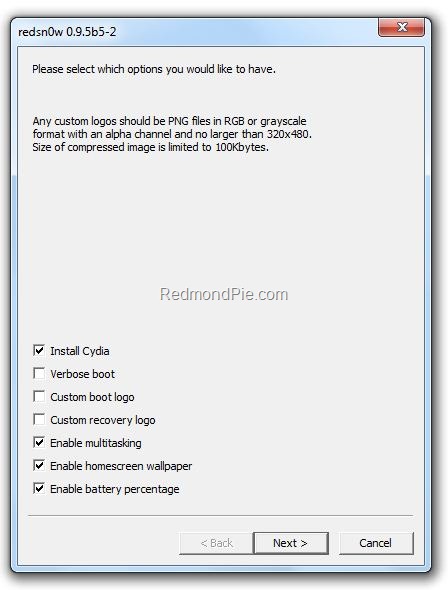
The iPhone Dev Team has just released a near final version of Redsn0w 0.9.5 for both Windows and Mac. This beta release, like all the previous ones is meant for iPhone 3G and iPod touch 2G only, running iOS 4 (formerly iPhone OS 4). Apart from multitasking and wallpapers support on iOS 4.0 on iPhone 3G and iPod touch 2G, this version also brings support to enable battery percentage which otherwise is disabled by Apple.

iOS 4.0 Jailbreak Redsn0w 0.9.5

The latest redsn0w beta lets you individually select whether multitasking and homescreen wallpaper are enabled. It also adds battery percentage and verbose boot mode options. (Verbose boot shows you the kernel messages during boot)
Note: Once you enable battery percentage, you actually toggle it off and on via Settings→General→Usage.
Warning Note: This release is strictly meant for official activated iPhones, if you rely on an unlock, stay away from this release.
Instructions to jailbreak iPhone 3G and iPod touch 2G on iOS 4.0 GM using Redsn0w 0.9.5 as usual are exactly similar to the last release. Please read all the instructions posted here carefully before upgrading and

jailbreaking your phone on iOS 4.
Download Redsn0w 0.9.5 for Windows
Download Redsn0w 0.9.5 for Mac
Download iPhone iOS 4.0 GM Release
Download iTunes 9.2 for Windows and Mac

iPhone 3GS users should follow the guide posted here to jailbreak iOS 4 using PwnageTool bundles.
If you are on iPhone OS 3.1.3, you can follow our step by step guides to jailbreak iPhone 3GS with Spirit here, iPod touch 3G untethered here, and iPad on OS 3.2 here.
Apple is all set to release the final version of iOS 4 on Monday, followed by first of iPhone 4 devices that will ship next week (June 24th). Final versions of these jailbreaking and unlocking tools for iOS 4 / iPhone 3.1.3 on 05.12.01 baseband can be expected right after the said devices have been released. Stay tuned as will update you, with complete how-to guides whenever they are available for download.
You may also like to check out:

You can follow me on twitter to keep yourself updated on all the latest iPhone jailbreaking and unlocking releases.

Source: redmondpie

Friday, June 11, 2010

Redsn0w 0.9.5b5 iOS 4.0 Jailbreak Brings Multitasking, Wallpapers to iPod touch 2G and iPhone 3G

Redsn0w jailbreak tool has been updated to version 0.9.5b5 which brings full support for iPod touch 2G, along with optional support to enable multitasking and wallpapers on iOS 4.0 (formerly iPhone OS 4) on iPhone 3G and iPod touch 2G which otherwise are disabled by Apple.

redsn0w 0.9.5
Warning Note: This release is strictly meant for official activated iPhones, if you rely on an unlock, stay away from this release.

The redsn0w beta has been updated for 4.0GM, and it now supports the iPod touch 2G too. Multitasking and homescreen wallpaper are now turned on by default (Apple doesn’t normally allow this on these 2 devices).
Because 4.0GM isn’t yet public, you’ll need a Mac and iTunes 9.2 to use it. Since this redsn0w beta is intended only for those with legitimate developer program access, this shouldn’t be a problem.
Just like our other betas, this one intentionally doesn’t “hactivate”. Please wait for Apple’s public release of 4.0 for that part of it.
Instructions to jailbreak iPhone 3G on iOS 4.0 GM using Redsn0w 0.9.5b5 are exactly similar to the last release. Please read all the instructions posted here carefully before upgrading and jailbreaking your phone to iOS 4.
Download Redsn0w 0.9.5b5 for Mac [Mirror]
Download iPhone iOS 4.0 GM Release

iPhone 3GS users should follow the guide posted here to jailbreak iOS 4 using PwnageTool bundles.
If you are on iPhone OS 3.1.3, you can follow our step by step guides to jailbreak iPhone 3GS with Spirit here, iPod touch 3G untethered here, and iPad on OS 3.2 here.

You can follow me on twitter to keep yourself updated on all the latest iPhone jailbreaking and unlocking releases.


Source: redmondpie

Sunday, March 7, 2010

TeamViewer : Access Windows and Mac Remotely From iPhone


When it comes to access a computer remotely, TeamViewer is the first choice. The program can be used, to helping friends with problems, or just look up at home some time on the PC/Mac. This requires the installation of TeamViewer client software on the computer. Just install the application on the host computer and see the password you enter to enter the PC / Mac, now you can also use this wonderful application on your iPhone/iPod.

app-store
1. Install and start TeamViewer Pro from the AppStore
2. Install and start TeamViewer 5 on your PC or TeamViewer 4 on your Mac (www.teamviewer.com)
3. Enter your PC’s or Mac’s ID and password directly in the TeamViewer interface on your iPhone / iPod Touch to connect.
 The free TeamViewer license is intended solely for private use, who wants to use TeamViewer from the iPhone for business, investments must be 99.99$ in Pro version. The application is available for iPhone and iPod Touch, requires firmware version 2.2.1 or later

You can follow us on twitter to keep yourself updated on all the latest updates from around the world.


Source: ihackintosh

Sunday, October 18, 2009

PwnageTool 3.1.4 to unlock iPhone OS 3.1.2 for Mac OS X


Here are some details on our latest version of PwnageTool 3.1.4 for Mac OS X which supports the 3.1.2 release of the iPhone software for iPhone 2G/3G/3GS and iPod Touch 1G/2G.
If you’re already jailbroken (by whatever means), you don’t need to mess around with DFU mode at all.  Just create (or get from a friend) your custom IPSW and Option-Restore (Shift-Restore on Windows) to it via iTunes.  Don’t enter DFU mode at all.  Please make sure you are restoring to the custom IPSW, not the stock one from Apple!  For best results, use the latest iTunes (9.0.1) — which includes a nice new application organizer.
This release allows your baseband to remain unlocked at 3.1.2, but it does not unlock a new baseband put there by restoring to official 3.1.x.  It is super important that people who need the unlock to understand they can keep it only by starting at 3.0 (or earlier) and updating solely to custom IPSWs that don’t update the baseband.  For those who have been onboard the “unlock train”, simply install ultrasn0w via Cydia once you’ve restored to your custom IPSW.  Don’t forget to turn off the “3G” setting in Settings->General->Network if you use T-Mobile in the U.S.A.
Note for 3GS users not already jailbroken and stuck at 3.1.x: this version of PwnageTool has a side feature to jailbreak your 3GS.  It uses a simple implementation of the usb control msg hole found by chronicdev, geohot, and our very own gray.  (Update: please make sure iTunes and iTunesHelper are not running when PwnageTool asks you if your 3GS is already jailbroken/pwned).  Now that the hole is public and in use, we expect Apple to close it by the next major firmware update. That’s why 3GS users need to get their ECID hashes for 3.1.x now, and need to stay onboard the “jailbreak train” in all future updates.  For more details on what this means, please see our earlier posts or ask in our comments section (moderated by the always helpful @angie and@confucious!).
For the early adopters who ran blackra1n and are having problems with mobilesubstrate, winterboard, diskaid, or ifunbox, you can install a custom .ipsw from PwnageTool to fix these issues.  That’s because all jailbroken devices accept a custom .ipsw created by PwnageTool.  (However, if you ran blackra1n on a 3G or 3GS that means you updated to stock 3.1.x, and the carrier unlock is now out of reach.  We’ll continue to work on a carrier unlock for the latest basebands, but the timeframe for such an unlock is unknowable.)
Note: If you use internet tethering on a carrier that doesn’t officially support it, you’ll lose it by going to 3.1.x.  Stay back at 3.0 until a hack for that is developed.
SUMMARY:
  • The iPhone 3GS is now supported out of the box in PwnageTool 3.1.4 (or if you have upgraded to 3.1.x in iTunes)
  • The iPod 2G is still supported in PwnageTool 3.1.4 but you must already be jailbroken (we’ll update this if there’s a big demand from non-jailbroken ipt2G owners)
  • The iPod touch 3G is NOT supported
DETAILS:
  1. GOLDEN RULE: If you are using a iPhone 3G or iPhone 3G(S) with ultrasn0w and rely on ultrasn0w to obtain cellular service then you should only update your device with an .ipsw that is made with the new PwnageTool. There are no second chances with this. You need to remember that PwnageTool will provide an upgrade path to newer versions of the iPhone software in the future.
  2. Please read all parts of this post before downloading and using these tools.
  3. Read items 1, 2 and 3 again and again.
  4. At the bottom of this post are the bittorrent files for the 3.1.4 capable version of PwnageTool.
  5. PwnageTool will work for the iPhone 3GS
  6. PwnageTool will work for the iPod touch 2G
  7. PwnageTool WILL work for Original iPhone (1st Generation), the iPhone 3G and iPhone 3G(S) and the iPod touch (1st Generation and 2nd Generation) but NOT the iPod touch 3rd generation.
  8. For 3G and 3G(S) users who are Pwned, PwnageTool is your key to updating in the future, just remember to never install an update directly from Apple, always use an .ipsw that has been created with PwnageTool.
  9. There is no Windows version of PwnageTool it is a Mac OS X tool only, we are not developing a Windows version of PwnageTool.
What’s a Baseband?
The ‘baseband’ is the generic nickname given to the internal components of the iPhone that handle the phone calls and Internet access. This ‘baseband’ is a tiny and unique independent computer system that runs inside your iPhone, it is separate to the main system that handles the applications (such as email and google maps) and it talks to the main part of the phone over an internal communications network.
Think of it like a cable modem or other peripheral that is attached to your home PC that needs occasional updates. When a software update is released and presented to you within iTunes the baseband is sometimes updated (to fix bugs or add new features).
The 3.1.2 update for the iPhone 3G and 3GS contains such an update, so running the vanilla updater straight away with iTunes will reprogram and update the baseband.
WHICH DEVICE DO I HAVE?
Read the description to identify your device, once you have correctly identified your device follow the specific instructions for that device as listed below.
SIM Free/SP Unlocked/Factory Unlocked iPhone 3G(S)
This applies if you bought your iPhone 3G(S) for $$$$$$$. This model of iPhone 3G(S) doesn’t have an Service Provider lock (aka factory unlocked) and you are able to put any SIM card into the phone and get service. Your phone is already unlocked so you do not need to worry about baseband updates, you can use PwnageTool to create an ipsw and then use this to update and jailbreak your phone.
SIM Free/SP Unlocked/Factory Unlocked iPhone 3G
This applies if you bought your iPhone 3G for $$$$$$$. This model of iPhone 3G doesn’t have an Service Provider lock (aka factory unlocked) and you are able to put any SIM card into the phone and get service. Your phone is already unlocked so you do not need to worry about baseband updates,  you can use PwnageTool to create a 3.1.ipsw and then use this to with iTunes to upgrade and jailbreak your phone.
iPhone 3G
Use PwnageTool to do the magic and then restore with iTunes using your newly created .ipsw
iPhone 3G(S)
Use PwnageTool to do the magic and then restore with iTunes using your newly created .ipsw
iPhone 2G (1st Generation)
Use PwnageTool to do the magic and then restore with iTunes using your newly created .ipsw ‘nuff said, you don’t need to worry about anything, the baseband will be unlocked, the phone jailbroken.
iPod Touch 1G (Original iPod Touch)
Use PwnageTool to create a firmware image and restore with that .ipsw using iTunes.
iPod Touch 2G
Use PwnageTool to create a firmware image and restore with that .ipsw to your already jailbroken device using iTunes.
iPod Touch 3G
At this time PwnageTool does not support this device.
Official Bittorrent Releases -
  • PwnageTool 3.14 Torrent
  • PwnageTool_3.1.4.dmg.5122330.TPB.torrent
  • SHA1(PwnageTool_3.1.4.dmg.5122330.TPB.torrent)= d9d44258ade35623ec71e83520943b6f4baa568a
Unofficial Mirrors
The following links are unofficial download mirrors, you download these at your own risk, we accept no responsibility if your computer explodes or if it becomes part of a NASA attacking botnet or even worse if your hands fall off mid-way during the use of these files. We do not check these links or archives and we accept no responsibility with regard to the validity of the files, or with other content these links provide or with the content that is on the linked site.  Always check the published SHA1 sums. We would prefer that you downloaded the official bittorrent release that is linked above, but you are welcome to try these if you really must. Mirror owners should email direct links only to blog@iphone-dev.org , please don’t place mirrors in the comments as they will be deleted.
Source: Dev-Team

Tuesday, October 13, 2009

All aboard the update train!


Here are some details on our latest version of PwnageTool for Mac OS X that adds support for the 3.1 release of the iPhone software for iPhone 3GS and iPod Touch 2G.
SUMMARY:
The iPhone 3GS is now supported in PwnageTool 3.1.3, assuming the phone was pwned at 3.0 or 3.0.1 - PwnageTool does not support the 3GS out of the box. If your iPhone 3GS has 3.1 preinstalled and is not Pwned then there is no tested jailbreak solution at the moment.
The iPod 2G is now supported in PwnageTool 3.1.3, assuming the iPod 2G was pwned at 3.0 or 3.0.1 - PwnageTool does not support the iPod 2G with 3.1 software out of the box.
DETAILS:
  1. GOLDEN RULE: If you are using a iPhone 3G or iPhone 3G(S) with ultrasn0w and rely on ultrasn0w to obtain cellular service then you should only update your device with an .ipsw that is made with the new PwnageTool. There are no second chances with this. You need to remember that PwnageTool will provide an upgrade path to newer versions of the iPhone software in the future.
  2. Please read all parts of this post before downloading and using these tools.
  3. Read items 1, 2 and 3 again and again.
  4. At the bottom of this post are the bittorrent files for the 3.1 capable version of PwnageTool.
  5. PwnageTool will work for the iPhone 3GS assuming you have already Pwned it at 3.0 or 3.0.1
  6. PwnageTool will work for the iPod touch 2G assuming you have already Pwned it at 3.0 or 3.0.1
  7. PwnageTool WILL work for Original iPhone (1st Generation), the iPhone 3G and iPhone 3G(S) and the iPod touch (1st Generation and 2nd Generation) but NOT the iPod touch 3rd generation.
  8. For 3G and 3G(S) users who are Pwned, PwnageTool is your key to updating in the future, just remember to never install an update directly from Apple, always use an .ipsw that has been created with PwnageTool.
  9. There is no Windows version of PwnageTool it is a Mac OS X tool only, we are not developing a Windows version of PwnageTool.
What’s a Baseband?
The ‘baseband’ is the generic nickname given to the internal components of the iPhone that handle the phone calls and Internet access. This ‘baseband’ is a tiny and unique independent computer system that runs inside your iPhone, it is separate to the main system that handles the applications (such as email and google maps) and it talks to the main part of the phone over an internal communications network.
Think of it like a cable modem or other peripheral that is attached to your home PC that needs occasional updates. When a software update is released and presented to you within iTunes the baseband is sometimes updated (to fix bugs or add new features).
The 3.1 update for the iPhone 3G and 3GS contains such an update, so running the vanilla updater straight away with iTunes will reprogram and update the baseband.
WHICH DEVICE DO I HAVE?
Read the description to identify your device, once you have correctly identified your device follow the specific instructions for that device as listed below.
SIM Free/SP Unlocked/Factory Unlocked iPhone 3G(S)
This applies if you bought your iPhone 3G(S) for $$$$$$$. This model of iPhone 3G(S) doesn’t have an Service Provider lock (aka factory unlocked) and you are able to put any SIM card into the phone and get service. Your phone is already unlocked so you do not need to worry about baseband updates, if your device was Pwned at 3.0 or 3.0.1 then you can use PwnageTool to create an ipsw and then use this to update and jailbreak your phone.
SIM Free/SP Unlocked/Factory Unlocked iPhone 3G
This applies if you bought your iPhone 3G for $$$$$$$. This model of iPhone 3G doesn’t have an Service Provider lock (aka factory unlocked) and you are able to put any SIM card into the phone and get service. Your phone is already unlocked so you do not need to worry about baseband updates,  if your device was Pwned at 3.0 or 3.0.1 then you can use PwnageTool to create a 3.1.ipsw and then use this to with iTunes to upgrade and jailbreak your phone.
iPhone 2G (1st Generation)
Use PwnageTool to do the magic and then restore with iTunes using your newly created .ipsw ‘nuff said, you don’t need to worry about anything, the baseband will be unlocked, the phone jailbroken.
iPod Touch 1G (Original iPod Touch)
Use PwnageTool to create a firmware image and restore with that .ipsw using iTunes.
iPod Touch 2G
Use PwnageTool to create a firmware image and restore with that .ipsw using iTunes, this will only work if you are already Pwned at 3.0 or 3.1. If you are at 3.1, downgrade to 3.0 and use redsn0w to Pwn 3.0 then you have an upgrade path using PwnageTool.
iPod Touch 3G
At this time PwnageTool does not support this device.
Official Bittorrent Releases -
Unofficial Mirrors
The following links are unofficial download mirrors, you download these at your own risk, we accept no responsibility if your computer explodes or if it becomes part of a NASA attacking botnet or even worse if your hands fall off mid-way during the use of these files. We do not check these links or archives and we accept no responsibility with regard to the validity of the files, or with other content these links provide or with the content that is on the linked site.  Always check the published SHA1 sums. We would prefer that you downloaded the official bittorrent release that is linked above, but you are welcome to try these if you really must. Mirror owners should email direct links only to blog@iphone-dev.org , please don’t place mirrors in the comments as they will be deleted.
Source: Developer Team