5% Off Powermat

Join The Community

Showing posts with label iPod-Touch. Show all posts
Tuesday, February 8, 2011

LastApp Enables Fast Apps Switching in iPhone, iPad and iPod touch


It is quite common to switch from one running app to another by tapping on Alt + Tab buttons on Windows PC and if you wonder how you are able to do that quickly on your iPhone, then the simple tweak from BigBoss repo could be the right option for you. Named as LastApp, it enables users to switch between two apps quickly, making your usage on iOS devices much more effective than previous.

Wednesday, December 15, 2010

Enable AirPlay From iPhone, iPad, iPod touch to Mac with AirPlayer


After releasing a jailbreak app which enables AirPlay functionality via third-party appsErica Sadun has now released AirPlayer for Mac OS X which mimics as Apple TV (2nd-gen) to playback videos from iPhone, iPad and iPod touch to your Mac. Perfect for those of you who use 27-inch iMac or Cinema Display as your TV !

Monday, December 13, 2010

Watch Flash Videos (Vimeo, Megavideo, Dailymotion) on Your iPhone, iPad, iPod touch “Without” Jailbreak


A new bookmarklet by the name of iOSFlashVideo has been released which allows iPhone, iPad and iPod touch users to watch Flash videos from sites such as Megavideo, Vimeo, Dailymotion, Flickr Video etc. right from the Safari browser (via native iOS media player).
Best of all, it doesn’t require you to jailbreak your iOS device! All you ever need to do is to add a bookmark to your browser, and you are done !
Follow the instructions below to set-up iOSFlashVideo on your iOS device.

Sunday, December 12, 2010

New TinyUmbrella Update Will Allow You to Restore iPhone, iPad, iPod touch Without iTunes


The developer behind the well known TinyUmbrella program has confirmed that a new upcoming update to his program will allow you to restore your iPhone, iPad and iPod touch to a selected iOS firmware without having to use iTunes.
I’ve been working on a new and improved version of TinyUmbrella that will, among other things, allow you to restore your iDevice without iTunes. With the holiday season and work, this will take me a bit to get working the way I want it. I appreciate your patience and your support. You guys are awesome :) No ETAs yet but I’ll post updates here and on twitter.

Monday, December 6, 2010

Stream Your iPhone / iPad / iPod touch Camera Roll Videos via AirPlay Using Air Home Video [Jailbreak App]


One of the most annoying limitation of iOS 4.2’s AirPlay feature is the inability to stream videos that you took on your iPhone to your PC or Mac with iTunes via AirPlay, or to the Television sets connected to the 2nd-gen Apple TV.

Thursday, November 4, 2010

Phone Disk [iPhone Disk Mounter]

iPad, iTouch or iPhone Disk Mode is made easy with Phone Disk. Using your standard USB cable, this tiny program runs in the menu bar or system tray of your Mac or PC. When it finds an iPod Touch or iPhone it seamlessly mounts it to your file system so you can directly access its files using Windows Explorer, Finder and every other program. 

Wednesday, October 20, 2010

PwnageTool 4.1 for Jailbreaking Apple TV 2G, iPhone 4, iPad and iPod touch 4G Now Available for Download

The iPhone Dev Team has finally released PwnageTool 4.1 which is based on recently released Geohot’s bootrom-based Limera1n exploit. This exploit enables this new version of PwnageTool to build custom firmware files for A4 devices like iPhone 4, iPad, Apple TV 2G and iPod touch 4G which was something, previously not possible.

Sunday, October 17, 2010

How to Jailbreak iPhone 4, 3GS, iPad, iPod touch 4G / 3G on iOS 4.1 with GreenPois0n on Mac OS X [Guide]


The following step by step instructions are going to help you jailbreak iOS 4.1 on iPhone 4, 3GS, iPad, iPod touch 4G / 3G using GreenPois0n on Mac OS X. Support for Apple TV and iPod touch 2G will be added soon.

Wednesday, October 13, 2010

Jailbreak iOS 4.1 iPhone 4, 3GS, iPod touch 4G, iPad with GreenPois0n [How to Guide]


Chronic Dev Team has finally released GreenPois0n to the world. You can use it to jailbreak iOS 4.1 on iPhone 4, iPhone 3GS, iPod touch 4G / 3G and iPad. Support for iPod touch 2G and Apple TV will be added soon.

Download GreenPois0n to Jailbreak iPhone 4, 3GS, iPod touch 4G / 3G, iPad


GreenPois0n is now available for download. If for some reason Limera1n didn’t work for you, you can give this one a try to jailbreak iOS 4.1 on iPhone 4, 3GS, iPod touch 4G / 3G and iPad. Support for iPod touch 2G and Apple TV will also be added soon.

Sunday, October 10, 2010

Download Limera1n to Jailbreak iOS 4.1 on iPhone 4, 3GS, iPad, iPod touch 4G


Its here folks! and its real!! Geohot is back big time with limera1n jailbreak for all  iOS devices including: iPhone 4, iPhone 3GS, iPad, iPod touch 4G / 3G / 2G, untethered running iOS 4.1.

Thursday, September 23, 2010

Jailbreak iPod touch 3G / iPod touch 2G (MC Model) on iOS 4.1 with Sn0wbreeze 2.0.1 [Guide]

Sn0wbreeze 2.0 was released earlier today. It brings support for a bunch of devices running on iOS 4.1. These include:

Wednesday, September 22, 2010

Jailbreak iOS 4.1 with Redsn0w 0.9.6 on iPhone 3G and iPod touch 2G [Guide]

The iPhone Dev-Team has just released a new version of Redsn0w 0.9.6b1 which can jailbreak iOS 4.1 on iPhone 3G and iPod touch 2G.

Wednesday, September 15, 2010

"Greenpois0n" coming soon


My Name is Greenpois0n. I'm on the way to jailbreak all the iDevices with the latest iOS 4.1.
So stay tuned with us.

Thursday, September 9, 2010

Confirmed ! iOS 4.1 Jailbreak Using Bootrom Exploit works on iPod touch 4G, iPhone 4 and Even iPad !

Just a quick little heads-up, MuscleNerd of iPhone Dev-Team has confirmed that iOS 4.1 Bootrom exploit which was found by another iPhone hacker named pod2g works on the newly released 4th-gen iPod touch 4G, iPhone 4 and even iPad !

Download iOS 4.1 Final Version for iPhone 4, 3GS, 3G, iPod touch

Apple has just released the very final version for iOS 4.1 for iPhone 4, iPhone 3GS, iPhone 3G and iPod touches. This version of iOS brings a number of new features for iPhone and iPod touch users including: Game Center, HDR Photography for iPhone 4, iTunes Ping, HD video upload on YouTube and MobileMe for iPhone 4 and iPod touch 4G and so on. If you want to keep your jailbreak and unlock, you better not update to this latest firmware now until and unless new jailbreak and unlock tools are available for download.
To update to iOS 4.1, all you need to do is to connect your iPhone or iPod touch with your computer via USB and start iTunes. You should now see a message as shown below. Simply click on “Download and Install” button to get on to the new firmware.

Sunday, July 18, 2010

How to Jailbreak iOS 4.1 Beta on iPod touch 3G / 2G


With Sn0wbreeze 1.8 for Windows, you can now create custom firmware files of iOS 4.1 Beta for iPod touches which are already jailbroken on iOS 4.x. Currently, only iPhone 3GS (old bootrom pwned on iOS 4.x, and new bootrom pwned on 3.1.2 or with 3.1.2 SHSH blobs), iPod touch 2G (non-MC model, and already jailbroken on iOS 4.x), and iPod touch 3G and 2G (MC model) pwned on 3.1.2 or with 3.1.2 SHSH blobs are supported. So if you qualify any of these requirements, then you are good to go for a iOS 4.1 Beta jailbreak with sn0wbreeze 1.8. iPhone 3G users will have to jailbreak using Redsn0w, guide for which is posted here.

Sn0wbreeze 1.8
The instructions for jailbreaking with Sn0wbreeze 1.8 as usual are exactly similar to the instructions we posted earlier for iPhone 3GS. Simply download iOS 4.1 Beta for your version of iPod touch, and then follow the complete step by step instructions posted herewhich will guide you on how to create custom firmware files. Once you have created a custom firmware file, you can simply restore to it via iTunes 9.2 to complete the jailbreakprocess.
Sn0wbreeze 1.8 for iPod touch 3G
More Coverage >> Jailbreak iOS 4 iPod touch 3G and iPod touch 2G MC Model
Feel free to ask me any question here should you run into any problem during thejailbreak process.
Download iTunes 9.2 for Windows and Mac OS X
Download iOS 4.1 for iPhone 3GS, iPhone 3G and iPod touch
Download .NET Framework 3.5 (required to run Sn0wbreeze)
Download Sn0wbreeze 1.8 (Windows Only) [Fast Mirror link]
You may also like to check out:
You can follow me on twitter to keep yourself updated on all the latest jailbreaking and unlocking releases.

Source: redmondpie

Downgrade iOS 4.1 iPhone 4, 3GS, 3G and iPod touch to iOS 4 / iPhone 3.1.3 / 3.1.2 [How to Guide]


iOS 4.1 Beta was seeded to developers yesterday. Since the iOS 4.1 is currently onlyjailbreakable on iPhone 3G and iPod touch 2G (non-MC model), you may want to downgrade your other iOS based devices from iOS 4.1 so that you can jailbreak them on iOS 4, or iOS 3.1.3 / 3.1.2 (formerly iPhone 3.1.3 or 3.1.2).
The following step by step guide will help you rollback / downgrade to iOS 4, iPhone 3.1.3 and 3.1.2 from iOS 4.1 Beta as long as you have SHSH blobs saved for the respective firmwares for iPhone 4, iPhone 3GS, iPhone 3G and iPod touches.

Downgrade iOS 4.1
Step 1: Download the required old ipsw firmware files. (Download links: iOS 43.1.3,3.1.2)
Step 2: Put your device into DFU mode (not recovery mode).
  • Connect your iPhone to your computer.
  • Turn iPhone off.
  • Start iTunes.
  • Hold Power and Home buttons together for 10 seconds or so.
  • Release Power button but keep holding the Home button until your computer recognizes a new USB device.
  • iTunes will now recognize your iPhone.
Note: Your iPhone screen at this time should be blank (black in color), if not, then you are most likely in Recovery Mode, not DFU mode.
(Step 3 is for iPhone 4 and iPhone 3GS users only. If you are on iPhone 3G or iPod touch 2G (non-MC model), skip Step 3 and continue from Step 4)
Step 3: This step is applicable to iPhone 4iPhone 3GS, iPod touch 3G and iPod touch 2G(MC model) which have their SHSH blobs (ECID SHSH) saved on Cydia for the firmware you downgrading on. If you don’t have your SHSH files saved, you cannot downgrade the mentioned devices.
So what we will do is to trick iTunes into thinking that it is watching Apple servers, while in real, we are going to change the address to Saurik’s server.
  • Navigate to C:\Windows\System32\drivers\etc\ and locate “hosts” file.
Hosts file in Windows
Mac users can get to “/etc/” directory by going through “Go –> Go to Folder” from Finder.
Hosts file in OS X
  • Open this “hosts” file in Notepad (for Windows) or TextEdit (for Mac OS X) and add this
74.208.105.171 gs.apple.com
line as shown in the screenshot below:
21
Now simply save this file and you are good to go!
NOTE for Windows 7 and Vista: Start “Notepad” with Administrator privileges by right clicking on “Notepad” app, and click on “Run as Administrator“ option.
Step 4: You will now have to restore your iPhone or iPod touch to the firmware you downloaded in Step 1. Click on your phone icon from the sidebar in iTunes. Now press and hold left “alt” (option) button on Mac (Left “Shift” button on Windows) on the keyboard and then click on “Restore” (Not “Update” or “Check for Update”) button in the iTunes and then release this button.
iTunes
This will make iTunes prompt you to select the location for your downloaded firmware file. Select that ipsw file and click on “Open”.
Step 5: Now sit back and enjoy as iTunes does the rest for you. This will involve a series of automated steps. Be patient at this stage and don’t do anything silly. Just wait while iTunes installs firmware on your iPhone or iPod touch. Your iPhone screen at this point will be showing a progress bar indicating installation progress. Now at some point, iTunes will throw 1011, 1013 or 1015 error at you. This is normal, just ignore this error as the firmware has already been successfully installed on the device.
Step 6: Now you will need to exit your device from Recovery Mode. To do this, download a program called RecBoot (Windows / Mac). Run it and the click on “Exit Recovery Mode” button. Your device will now restart normally.
RecBoot
This is it, you should now be able to jailbreak your device on this older OS.  For iPhone 3.1.2 firmware, you can use blackra1nPwnageToolredsn0wsn0wbreezeultrasn0wand blacksn0w to jailbreak and unlock your iPhone and iPod touch. For iPhone 3.1.3 firmware for iPhone 2G, 3G, 3GS and iPod touch 1G/2G, you can use redsn0w 0.9.3,redsn0w 0.9.4sn0wbreezePwnageTool 3.1.5. Unlocking can be done using ultrasn0w orblacksn0w. iPhone 3.1.3 (on devices with new bootrom and baseband) can use Spirit to jailbreak iPhone 3GS/3G and iPod touch 3G/2G.
You may also like to check out:
You can follow me on twitter to keep yourself updated on all the latest jailbreaking and unlocking releases.

Source: redmondpie

Tuesday, July 6, 2010

Jailbreak iOS 4 on iPod touch 3G and iPod touch 2G MC Model


Sn0wbreeze 1.7 for 4.0 has been released. Just like PwnageTool 4.0 / 4.01 for Macs, you can now create custom pwned / jailbroken ipsw files on Windows too which can now jailbreak all iOS devices (except iPhone 4) on iOS 4, including iPhone 3GS (new bootrom),iPod touch 2G (MC models) and iPod touch 3G. But there is a catch to it! You will need to have their SHSH blobs saved for iOS 3.1.2 in order to successfully jailbreak these devices on iOS 4. Also the jailbreak for iPhone 3GS (new bootrom), iPod touch 2G (MC models) and iPod touch 3G on iOS 4 will be tethered, which means whenever you turn off your phone, you will need to re-connect it to a computer to be able to turn it back on.

Sn0wbreeze 1.7
The step by step guide to jailbreak these devices is almost exactly similar to the last release. Simply follow the guide posted here to jailbreak your iPod touch on iOS 4 using Sn0wbreeze 1.7. Once you have created a custom firmware file, you can simply restore to it via iTunes 9.2. If there are any changes, we will redo the guide and post it again here.
Sn0wbreeze 1.7 (3)
If you don’t have your 3.1.2 (NOT 3.1.3SHSH blobs (ECID SHSH) files saved, you will have to then wait for the next version of Spirit which is likely to be released as soon as Apple releases the next firmware update i.e. iOS 4.0.1 / 4.1 and it will support all iOS devices including iPhone 4.
Download Sn0wbreeze 1.7 for Windows
You may also like to check out:
You can follow me on twitter to keep yourself updated on all the latest jailbreaking and unlocking releases.

Source: redmondpie

Sunday, June 27, 2010

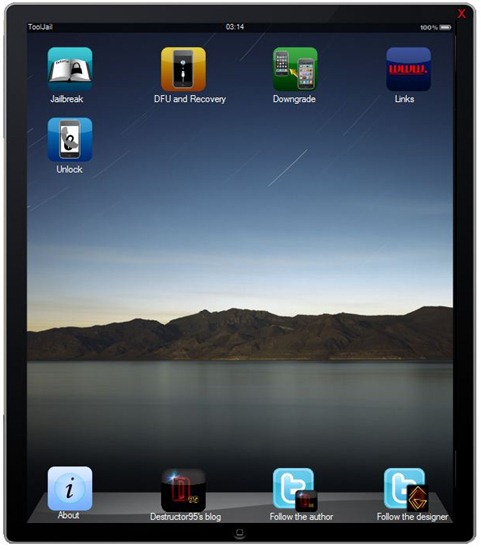
ToolJail 2.2 for iOS 4 iPhone and iPod touch Jailbreak Assistance


ToolJail has been just updated to version 2.2. This new version brings updates tojailbreak and unlock guides, and links for jailbreak tools for the newly released iOS 4. For those of you who don’t know, ToolJail (like f0recast) is designed to help iPhone newbie’s to jailbreak and unlock their iPhone and iPod touch. It contains all the necessary jailbreakand unlock instructions, along with how-to’s on DFU and Recovery Mode, downgradingfirmware, and direct download links for all the necessary tools required.

ToolJail 2.2
Some of the changes which version 2.2 of ToolJail brings are as follows.
  • New UI enhancements
  • Updated Jailbreak and Unlock guides for iOS 4
  • Updated download links for existing and new jailbreak and unlocking tools
Download ToolJail 2.2 for Windows
Download .NET Framework 3.5 (required to run ToolJail)
You may also like to check out:
You can follow me on twitter to keep yourself updated on all the latest jailbreaking and unlocking releases.

Source: redmondpie