5% Off Powermat

Join The Community

Showing posts with label AppSync. Show all posts
Friday, June 11, 2010

AppSync 4.0 Now Available for iOS 4.0 Jailbroken Devices

Yes you read that right ! AppSync for iOS 4.0 (formerly iPhone OS 4) is now available for all those of you who have managed to jailbreak your iPhones and iPod touches. For those of you who don’t know, AppSync patches MobileInstallation file on iOS which is needed in order to install .ipa files manually without using iTunes.
Make sure you have jailbroken your iPhone or iPod touch on firmware 4.0 before following the steps below. Complete step-by-step guide on how to jailbreak your iPhone 3GS can be found here, or for iPhone 3G and iPod touch 2G can be found here.
Step 1: Start “Cydia” on your iPhone.
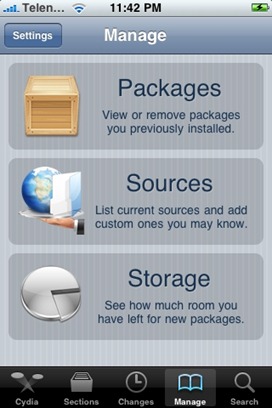
Step 2: Touch on “Manage” tab on the bottom.
Step 3: Now touch on “Sources” as seen in the screenshot below:
Cydia
 - MobileInstallation Patch

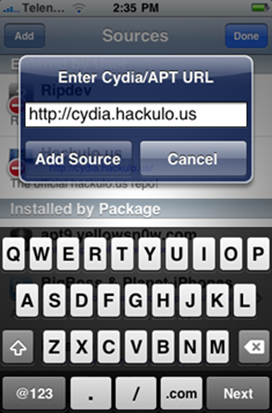
Step 4: Touch on “Edit”, and then on “Add”. You should now be prompted to enter a url source as seen in the screenshot below. Type “http://cydia.hackulo.us” and click on“Add Source”.
IMG_0004
Cydia will now automatically update your sources by following a series of automated steps as shown in the screenshots below:
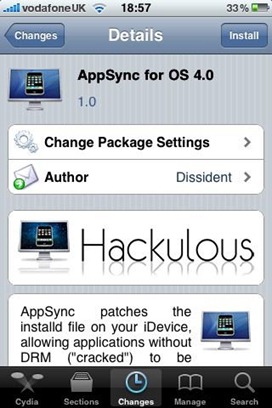
Step 5: After installation is completed. Search for “AppSync for OS 4.0” in Cydia and install this application. This app will automatically patch mobileinstallation file on your iPhone or iPod touch running firmware 4.0.
AppSync for OS 4.0
You should now be able to install .ipa files manually on your iPhone running firmware 4.0.
[Thanks to Dee3GS for the hat tip via Twitter]
You may also like to check out:
You can follow me on twitter to keep yourself updated on all the latest iPhone jailbreaking and unlocking releases.

Source: redmondpie

Monday, October 19, 2009

AppSync for iPhone 3.1.2 Jailbreak Firmware


AppSync patches MobileInstallation file on iPhone OS 3.x which is needed in order to install .ipa files manually without using iTunes. A new version of AppSync has now been released which is compatible with the latest iPhone 3.1.2 firmware. Make sure you havejailbroken your iPhone with firmware 3.1.2 before following the steps below. Complete step-by-step guide on how to jailbreak your iPhone with firmware 3.1.2 can be foundhere.
Here’s what you have to do to patch the mobileinstallation file on your iPhone:
Step 1: Start “Cydia” on your iPhone.
Step 2: Touch on “Manage” tab on the bottom.
Step 3: Now touch on “Sources” as seen in the screenshot below:

Step 4: Touch on “Edit”, and then on “Add”. You should now be prompted to enter a url source as seen in the screenshot below. Type “http://apt.macosmovil.com” and click on“Add Source”.


Cydia will now automatically update your sources by following a series of automated steps as shown in the screenshots below:


Step 5: After installation is completed. Search for “AppSync para OS 3.1(3.1.2)” in Cydia and install this application. This app will automatically patch mobileinstallation file on your iPhone running firmware 3.1.2.

You should now be able to install .ipa files manually on your iPhone running firmware 3.1.2.
UPDATE 1: Upon further investigation, I have found out that the original file version of “AppSync for OS 3.1(3.1.2)” which is posted at macosmovil repository is basically the same (v1.0) as the one posted earlier for OS 3.1, and both are compatible to work with iPhone OS 3.1.2.

Source: redmondpie