5% Off Powermat

Join The Community

Showing posts with label Tethering. Show all posts
Tuesday, October 27, 2009

Fix iPhone 3.1.2 Tethering and Visual Voicemail VVM

Last week we posted a complete step by step guide on how to enable Internet Tethering option on your iPhone 3G/3GS running iPhone firmware 3.1.2 which was based on the hack, originally found by the Dev-Team. While the hack worked flawlessly for some, many specially AT&T users were forced to choose between enabling either Tethering option or visual voicemail (VVM).


W1kedZ has finally found a fix for AT&T users who relied on MobileConfig file fromhttp://help.benm.at to enable Internet Tethering on their iPhone’s. Follow the steps below to enable both Tethering and Visual voicemail (VVM) on your iPhone 3G/3GS running iPhone 3.1.2 firmware (for AT&T users only):
Step 1: You will need to first follow the complete detailed guide posted here to enable Internet Tethering on your iPhone from Step 1 – Step 10.
Step 2: Make sure you do not install the MobileConfig file fromhttp://www.benm.at/help/help.php as mentioned in UPDATE 1 of our guide posted here. If you already have it installed, then you must first remove it by navigating to Settings -> General –> Profiles on your iPhone before moving to the next step.
Step 3: Download and install the corrected MobileConfig file by browsing to this link from mobile Safari on your iPhone. This corrected MobileConfig file basically has correct APN settings for both VVM and Tethering so that they don’t interfere with each other.

That’s it! Tethering and Visual voicemail should now both be running perfectly on yourjailbroken AT&T iPhone 3G/3GS running firmware 3.1.2.
You can ask me any question should you run into any problem in enabling Tethering and Visual voicemail (VVM) on your iPhone running firmware 3.1.2.
You can follow me on twitter to keep yourself updated on all the latest iPhone jailbreaking and unlocking releases.
Source: redmondpie

Sunday, October 18, 2009

Enable Tethering on iPhone 3.1.2 Jailbreak Firmware


Internet Tethering is a process which allows you to use your iPhone as a wireless modem to share its Internet connection with a computer via USB cable or Bluetooth interface. There have been several hacks floating around the web to enable this functionality, specially for AT&T users in the US, however, the latest iPhone firmware 3.1.2 has blocked all those hacks which means that tethering will no longer work for you if you have updated to firmware 3.1.2. Fortunately, there is an app called “MyWi” which can enable tethering on all iPhones (including 2G/3G/3GS) running 3.1.2 firmware with just a touch of a finger!
Features of MyWi 3.1.8:
  • Create WiFi Hotspot to connect mutiple laptops or mobile devices to share your iPhone’’s internet connection
  • 40 bit and 104 bit WEP Security to prevent others from accessing your WiFi HotSpot
  • Ability to enable USB and Bluetooth Tethering on your iPhone as well
  • Uses less battery and much faster then PdaNet due to native routing
  • Broadcasts the Network Name (SSID) – no need to fuss with creating an adhoc network on your laptop
  • Enable iPhone USB/Bluetooth tethering – even on firmware 3.1!
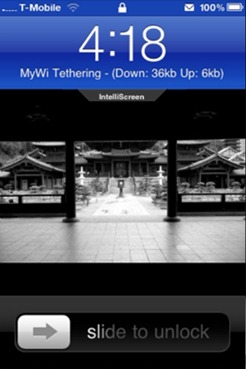
  • Shows up and down bandwith usage
Installation Instructions:
Follow the steps below to enable Internet Tethering on your iPhone 2G, 3G and 3GS running firmware 3.1.2:
NOTE: The following procedure requires a jailbroken iPhone running on firmware 3.1.2. Follow the step-by-step guide posted here in order to jailbreak your iPhone (2G, 3G and 3GS) on iPhone firmware 3.1.2.
Step 1: Goto Cydia, search for “MyWi” app and install it. MyWi will also install "RockApp” as a part of its package. Install RockApp manually if it isn’t installed automatically with MyWi app.
Step 2: Now start RockApp and create a free Rock ID for yourself.
Step 3: Sign in using this ID in RockApp and you should now see an update to MyWi app. Restart your iPhone once the update has been successfully installed.
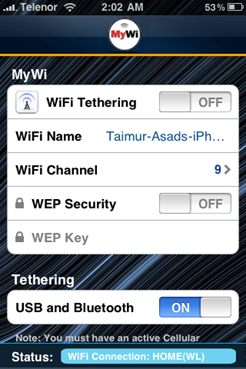
Step 4: Start MyWi app and turn on the option for USB/Bluetooth tethering.
Enable Internet Tethering on iPhone 3.1.2
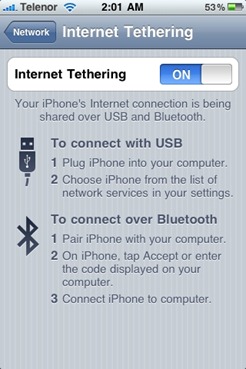
Step 5: Now simply navigate to Settings->General->Network->Internet Tethering on your iPhone and turn on the toggle for Internet Tethering.
Enable Internet Tethering on iPhone 3.1.2

That’s it! Ask me any question should you run into problem in enabling Tethering on your iPhone running firmware 3.1.2.

Source: redmondpie