5% Off Powermat

Join The Community

Showing posts with label iPad. Show all posts
Tuesday, February 8, 2011

LastApp Enables Fast Apps Switching in iPhone, iPad and iPod touch


It is quite common to switch from one running app to another by tapping on Alt + Tab buttons on Windows PC and if you wonder how you are able to do that quickly on your iPhone, then the simple tweak from BigBoss repo could be the right option for you. Named as LastApp, it enables users to switch between two apps quickly, making your usage on iOS devices much more effective than previous.

Thursday, December 23, 2010

Skyfire for iPad Brings Flash Video, Twitter and Facebook To The iPad ! Go Get It While It’s Hot !


The much awaited Skyfire for iPad has finally hit the iTunes App Store. Released for iPhone and iPod touch last month, Skyfire for iPad brings Flash video content, along with some other social networking which are not found in the native Mobile Safari browser.

Wednesday, December 15, 2010

Enable AirPlay From iPhone, iPad, iPod touch to Mac with AirPlayer


After releasing a jailbreak app which enables AirPlay functionality via third-party appsErica Sadun has now released AirPlayer for Mac OS X which mimics as Apple TV (2nd-gen) to playback videos from iPhone, iPad and iPod touch to your Mac. Perfect for those of you who use 27-inch iMac or Cinema Display as your TV !

Monday, December 13, 2010

Watch Flash Videos (Vimeo, Megavideo, Dailymotion) on Your iPhone, iPad, iPod touch “Without” Jailbreak


A new bookmarklet by the name of iOSFlashVideo has been released which allows iPhone, iPad and iPod touch users to watch Flash videos from sites such as Megavideo, Vimeo, Dailymotion, Flickr Video etc. right from the Safari browser (via native iOS media player).
Best of all, it doesn’t require you to jailbreak your iOS device! All you ever need to do is to add a bookmark to your browser, and you are done !
Follow the instructions below to set-up iOSFlashVideo on your iOS device.

Sunday, December 12, 2010

New TinyUmbrella Update Will Allow You to Restore iPhone, iPad, iPod touch Without iTunes


The developer behind the well known TinyUmbrella program has confirmed that a new upcoming update to his program will allow you to restore your iPhone, iPad and iPod touch to a selected iOS firmware without having to use iTunes.
I’ve been working on a new and improved version of TinyUmbrella that will, among other things, allow you to restore your iDevice without iTunes. With the holiday season and work, this will take me a bit to get working the way I want it. I appreciate your patience and your support. You guys are awesome :) No ETAs yet but I’ll post updates here and on twitter.

Monday, December 6, 2010

Stream Your iPhone / iPad / iPod touch Camera Roll Videos via AirPlay Using Air Home Video [Jailbreak App]


One of the most annoying limitation of iOS 4.2’s AirPlay feature is the inability to stream videos that you took on your iPhone to your PC or Mac with iTunes via AirPlay, or to the Television sets connected to the 2nd-gen Apple TV.

Thursday, November 4, 2010

Phone Disk [iPhone Disk Mounter]

iPad, iTouch or iPhone Disk Mode is made easy with Phone Disk. Using your standard USB cable, this tiny program runs in the menu bar or system tray of your Mac or PC. When it finds an iPod Touch or iPhone it seamlessly mounts it to your file system so you can directly access its files using Windows Explorer, Finder and every other program. 

Wednesday, October 13, 2010

Jailbreak iOS 4.1 iPhone 4, 3GS, iPod touch 4G, iPad with GreenPois0n [How to Guide]


Chronic Dev Team has finally released GreenPois0n to the world. You can use it to jailbreak iOS 4.1 on iPhone 4, iPhone 3GS, iPod touch 4G / 3G and iPad. Support for iPod touch 2G and Apple TV will be added soon.

Download GreenPois0n to Jailbreak iPhone 4, 3GS, iPod touch 4G / 3G, iPad


GreenPois0n is now available for download. If for some reason Limera1n didn’t work for you, you can give this one a try to jailbreak iOS 4.1 on iPhone 4, 3GS, iPod touch 4G / 3G and iPad. Support for iPod touch 2G and Apple TV will also be added soon.

Sunday, October 10, 2010

Jailbreak iOS 3.2.2 on iPad using Limera1n [How to Video Guide]


The new all iOS device jailbreak Limera1n is now available for download. It can jailbreak iPhone 3GS, iPod touch 3G, iPad, iPhone 4, iPod touch 4G on iOS 4.0 – 4.1 and beyond. Following instructions will help you jailbreak iPad on iOS 3.2.2.

Download Limera1n to Jailbreak iOS 4.1 on iPhone 4, 3GS, iPad, iPod touch 4G


Its here folks! and its real!! Geohot is back big time with limera1n jailbreak for all  iOS devices including: iPhone 4, iPhone 3GS, iPad, iPod touch 4G / 3G / 2G, untethered running iOS 4.1.

Sunday, June 27, 2010

Spirit Jailbreak Fix for iTunes 9.2 on iOS 3.1.3 for iPhone and iOS 3.2 for iPad


The best and the most easiest jailbreak tool has just been updated (unofficially?) to bring support for iTunes 9.2. Earlier when Apple released the final version of iTunes 9.2, it broke the compatibility with Spirit and so this new version brings the required fix to make it compatible with iTunes 9.2. However no new feature has been added. It still does not work with iOS 4 and iPhone 4. Only iOS 3.1.3 and 3.1.2 for iPhone 3GS, 3G, 2G, iPod touch, and iOS 3.2 for iPad is supported.

Spirit with iTunes 9.2
Instructions are still the same. You can follow our complete step by step guides to jailbreak your iPad, iPhone 3GS, 3G, 2G and iPod touch 3G/2G on 3.1.3 using Spirit.
For those of you with iPhone 3GS (new bootrom), iPod touch 2G (MC model) and iPod touch 3G who upgraded to iOS 4, only to find out that you cant jailbreak it back can actually downgrade back to iOS 3.1.3 and then jailbreak it using Spirit. Step by step guide for downgrading your iOS device from iOS 4 to iOS 3.1.3 can be found here (works only if you have SHSH blobs saved for 3.1.3).
Unlocking can be done on any baseband using Ultrasn0w 0.93, instructions for which isposted here.
Download Spirit for Windows (with iTunes 9.2 support)
Download iTunes 9.2 for Window and Mac
You may also like to check out:
You can follow me on twitter to keep yourself updated on all the latest jailbreaking and unlocking releases.

source: redmondpie

Monday, May 10, 2010

Recover Deleted Photos from iPhone / iPad After Spirit Jailbreak


The initial release of Spirit had this bug, which accidently deleted all photos from the iDevice which you used to jailbreak with it. If you were wise enough to make a backup before jailbreaking your device, you can now recover it using iPhone Backup Extractor.
Follow the step by step guide posted below to recover your deleted photos from iPhone, iPad or iPod touch after jailbreaking it with Spirit.
Step 1: Install OpenSSH on your device. Instructions for installing OpenSSH on iPad can be found here, and for iPhone/iPod touch can be found here.
Step 2: Download and install iPhone Backup Extractor.
(Download links: Windows 32-bit64-bit – Mac OS X)
Step 3: Run iPhone Backup Extractor and select the last backup which you made before jailbreaking your device using Spirit.
Step 4: Navigate to Media/Media/DCIM and select this folder. Click ‘Next’ to save the files locally on your hard drive.
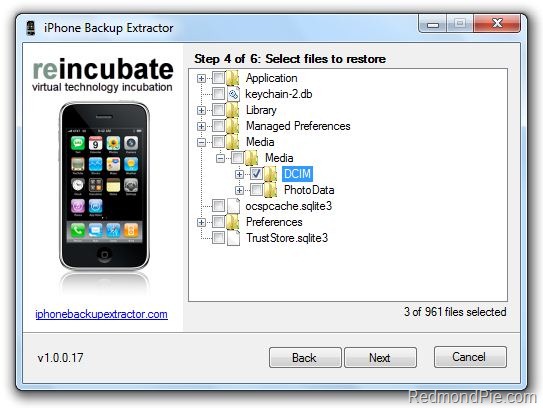
iPhone Backup Extractor (1)
Step 5: Download and install Cyberduck for Mac or WinSCP for Windows. Enter the following details to login to your iPad:

Cyberduck
  • Server: The IP address of your iPad. Settings –> WiFi –>
  • Username: root
  • Password: alpine
  • Protocol: SFTP (SSH File Transfer Protocol)
WinSCP
  • Hostname: The IP address of your iPad. Setting –> WiFi –>
  • User name: root
  • Password: alpine
  • Protocol: SCP
Step 6: Navigate to /User/Media/ directory and copy over the folder DCIM folder which you just extracted from the backup and to this location.
WinSCP - iPhone 3GS
Step 7: Reboot your iPhone/iPad/iPod touch.
That’s it ! you should now have all your photos back like you did before Spirit jailbreak.
You may also like to check out:
You can follow me on twitter to keep yourself updated on all the latest from iPhone, iPad and iPod touch jailbreaking and unlocking releases.

Source: redmondpie

Download Spirit to Jailbreak iPhone 3.1.3, iPad 3.2, iPod touch 3G


The all-in-one untethered iDevice jailbreak for iPhone 3.1.3, iPad 3.2 and iPod touch 2G/3G is finally here. Available for both Windows and Mac OS X, Spirit is a userland jailbreak but it does not work out-of-the browser as previously thought. It is in fact a simple one click app, like Blackra1n which can jailbreak (not unlock) any Apple iDevice on iPhone 3.1.2 or 3.1.3.

Spirit on Windows for iPhone and iPad
It is also important to note here that Spirit wont unlock your phone. It is a jailbreaking tool only that will only work on devices which are activated via iTunes. So if you rely on an unlock, DO NOT upgrade to stock firmware or you’ll be stuck. Unlock for iPhone 3.1.3 on 05.12.01 baseband wont be out before the next iPhone hit the shelves. And that wont be before June/July of this year.
Make sure that you have your SHSH files saved. You can jailbreak without saving SHSH files but you wont be safe once Apple patches the exploit used by Spirit. Follow the instructions posted here to save your SHSH blobs.

Official description is as follows.
What’s Spirit?
  • Spirit is an untethered jailbreak for iPad, iPhone, and iPod touchon the latest firmwares.
  • Spirit is not a carrier unlock.
  • If you currently are using a tethered jailbreak, you have to restore to use Spirit. Do not upgradeif you use an unlock on an iPhone 3G or 3GS. (You can, however, restore to 3.1.2 if you have SHSH blobs for that version.)
Requirements
  • Any iPad, iPhone, or iPod touch on firmware 3.1.2, 3.1.3, or 3.2.
  • An activated device: one not stuck on the Connect to iTunes orEmergency Call screen.
  • Any version of iTunes 9 (including 9.1.1).
Note: On iPad, all this is still sort of beta. Some packages in Cydia, not designed for iPad, might screw up your system and require you to restore. Be careful. (And no, Cydia’s appearance is not final.)
A complete step by step guide for jailbreaking using Spirit will be up soon. Stay tuned!
[Thanks to Chris X and Robert Cray for the hat tip via email!]

Download Spirit for Windows [Fast Mirror Link]
Download Spirit for OS X [Fast Mirror Link]


UPDATE 1: Step by step guide for jailbreaking iPad on OS 3.2 with Spirit is up! You canfollow it here.


UPDATE 2: Step by step guide for jailbreaking iPhone 3G/3GS on OS 3.1.3 Untethered with Spirit is up! You can follow it here.


UPDATE 3: Have an iPod touch 3G ? Well You Can Now Jailbreak it Untethered Using Spirit ! Follow the link posted here for the instructions!


UPDATE 4: Spirit jailbreak tool has been updated for both Windows and Mac. The updates fixes photo deletion bug, and random errors on Windows. All download links posted above has been updated.

You can follow me on twitter to keep yourself updated on all the latest from iPhone, iPad and iPod touch jailbreaking and unlocking releases.

Source: redmondpie

Wednesday, March 31, 2010

iPad 3.2 firmware available for download

Looks like Apple has gone ahead and put the iPad firmware on their website, readily available for download to the public, before the shipping of the iPad starts.
iH8snow, published so in his twitter and now is just a matter of minutes for news about it to start spreading around. We will of course update this post as more news do become available. What do you think? Exited? or do you expect nothing much from this?

iPad 3.2
If you want to grab an early copy or want to do some “testing” on it, here is the direct link to apple
This post is written by @osornior who is a iPhone enthusiast tormented by a nasty new 3gs. Stay tuned with us for more of iPhone news, you can follow us on twitter via @iTune2iPhone and keep your self updated with the latest of iPhone community.
Source: ihackintosh