5% Off Powermat

Join The Community

Showing posts with label Jailbreak Assistant. Show all posts
Sunday, June 27, 2010

ToolJail 2.2 for iOS 4 iPhone and iPod touch Jailbreak Assistance


ToolJail has been just updated to version 2.2. This new version brings updates tojailbreak and unlock guides, and links for jailbreak tools for the newly released iOS 4. For those of you who don’t know, ToolJail (like f0recast) is designed to help iPhone newbie’s to jailbreak and unlock their iPhone and iPod touch. It contains all the necessary jailbreakand unlock instructions, along with how-to’s on DFU and Recovery Mode, downgradingfirmware, and direct download links for all the necessary tools required.
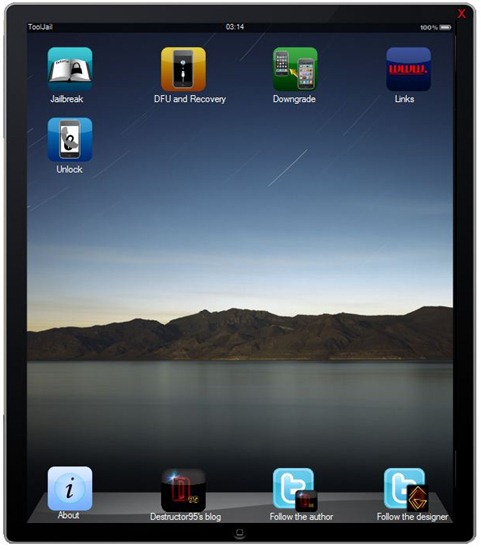
ToolJail 2.2
Some of the changes which version 2.2 of ToolJail brings are as follows.
  • New UI enhancements
  • Updated Jailbreak and Unlock guides for iOS 4
  • Updated download links for existing and new jailbreak and unlocking tools
Download ToolJail 2.2 for Windows
Download .NET Framework 3.5 (required to run ToolJail)
You may also like to check out:
You can follow me on twitter to keep yourself updated on all the latest jailbreaking and unlocking releases.

Source: redmondpie

Tuesday, March 16, 2010

ToolJail for iPhone 3.1.3 Jailbreak Assistance


If you loved F0recast, you will love this one too. ToolJail is designed for iPhone newbie’s to help them jailbreak and unlock their iPhone and iPod touch. It contains all the necessary jailbreak and unlock instructions, along with how-to’s on DFU and Recovery Mode, downgrading firmware, and direct download links for all the necessary tools required.

ToolJail for iPhone 3.1.3
You use it by simply entering all the info about your iPhone and iPod touch and then the tool will report back on whether or not you can jailbreak and unlock your phone. In case you don’t know something, you can always click “How to find out?” link which will guide you in finding out that particular info about your iPhone or iPod touch.
ToolJail for iPhone 3.1.3
Also take a look at our complete jailbreaking guide for iPhone 3.1.3 firmware for iPhone 2G, 3G, 3GS and iPod touch 1G/2G using redsn0w 0.9.3redsn0w 0.9.4sn0wbreeze,PwnageTool 3.1.5. Unlocking can be done using ultrasn0w or blacksn0w.
For iPhone 3.1.2 firmware, you can use blackra1nPwnageToolredsn0wsn0wbreeze,ultrasn0w and blacksn0w to jailbreak and unlock your iPhone and iPod touch.
You may also like to check out:
Download ToolJail 1.2.1 by Destructor95

You can follow me on twitter to keep yourself updated on all the latest iPhone jailbreaking and unlocking releases.

Source: redmondpie

Sunday, March 7, 2010

ToolJail : Your Ultimate Jailbreak Assistant (Coming Soon)

Destructor95 our Italian friend is working on a new application for Windows that assist you to choose  appropriate guide and tools to jailbreak/unlock your iPhone and iPod Touch. We got the beta version to test and we are pretty impressed by the hard work of Destructor. ToolJail is mini Wikipedia for iPhone/iPod jailbreak. It contains all necessary how to guides regarding jailbreak, unlock, check iBoot,  check the MC model, the ECID etc.

The operation of ToolJail is very simple, once we started the program click on the Jailbreak Tutorialbutton from right sidebar, and a new Window with various pull-down menu will appear on your screen

  1. Select the device type i.e. iPhone 2G/3G/3GS etc.
  2. Select the firmware version installed on your iPhone / iPod
  3. Select your iBoot (only for iPhone 3GS) If you don’t know about your iBoot click on How can i know itbutton highlighted just under the option.
  4. Confirm If you have saved ECID through Cydia (only for iPhone 3GS)
  5. Select your computer operating system i.e. Mac/Windows
  6. iPod Touch 2G should confirm your Model MB or MC
Once you have completed all fields, simply click on “Search” button and a small window will appear in green“You can do the Jailbreak” or red “You can’t do the Jailbreak.” If you are eligible for jailbreak you’ll be prompt to click on  “Start Guide” and a window will open immediately with step by step guide specific to your situation, allowing you to run the Jailbreak without error.
  • Next Section is DFU mode and Recovery mode, here you can learn about how to put your iPhone in DFU mode and recovery mode with real time instructions.


  • Third section is for downgrading related guides and information, here you can find how to downgrade your iPhone OS to a lower version.
  • Last section is dedicated to important download links for Redsn0w, Pwnage tool, Blackra1n, iPhone Firmware etc. etc.
This tool is almost done and we’ll announce the release/availability very soon on your favorite jailbreak blog iTune2iPhone so stay tuned with us. 
You can follow us on twitter to keep yourself updated on all the latest updates from around the world.
Source: ihackintosh